Licence portal
Reference — The licence portal at license.herzog-cab.com: customer account, modules, computers, users and requests in one place
What you use this area for
In the licence portal, your company's administrators manage the customer account: which modules are activated, which computers occupy seats, who may sign in, and which requests are currently in progress at Herzog. Every user can also change their password and name there, set up a second factor and download the latest program version.
You reach the portal at license.herzog-cab.com — from the desktop app also via Settings > Licence > Open licence portal, from the web app via User menu > Account and users > Open licence portal.
-
My account
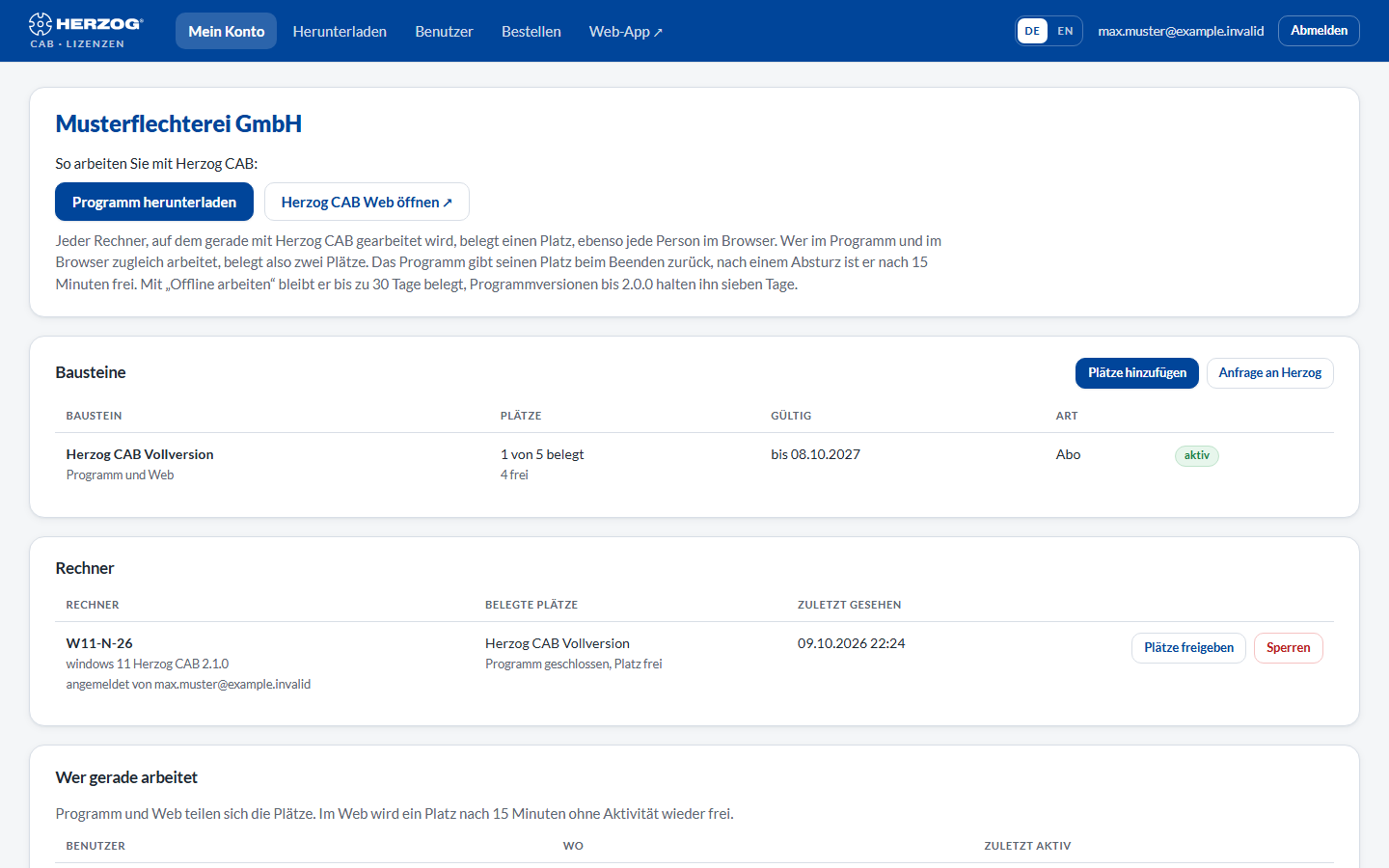
Modules with seats and term, signed-in computers, who is currently working, open requests.
-
Users
Invite colleagues, change names and roles, deactivate accesses, renew invitations.
-
Machine models
Distribute model licences for the Braiding Simulator to users. Only for administrators and only if the account has model licences.
-
Order
Order an annual subscription, buy additional seats or renew. The procedure is the same as in the web app.
-
Request licence
Request more seats, a renewal or a different module directly from Herzog.
-
Download
The latest version of the desktop app for Windows and macOS including release notes.
-
Password, second factor and name
Change your password, set up two-step sign-in with an authenticator app and change your own name.
Signing in
The portal asks for the E-mail address and Password of your account user — the same credentials as in the desktop app and the web app. If a second factor is set up for your user, a second page follows on which you enter the six-digit code from the authenticator app.
| Element | Meaning |
|---|---|
| E-mail address / Password | Your credentials in the customer account. |
| Sign in | Signs you in; if a second factor is set up, the code prompt follows. |
| Forgot password | Requests a link for setting a new password (see below). |
You do not create an access yourself: Herzog sets up the account and invites the first administrator; further users are invited by an administrator of your account — see Customer account and invitation.
Forgot password
- On the sign-in page, click Forgot password.
- Enter your e-mail address and click Request link.
- If an access exists for this address, you receive an e-mail with a link. It is valid for one hour.
- Use the link to set a new password (at least 10 characters).
The new password immediately also applies to the desktop app and the web app.
The screen at a glance
After signing in, the portal shows a menu bar at the top, and below it the My account page.
| Menu item | Content |
|---|---|
| My account | Start page: company, customer number, modules, computers, who is currently working, requests. |
| Download | Latest version of the desktop app. Only with a module for the program. |
| Users | User list, invitations, roles. |
| Machine models | Assign model licences for the Braiding Simulator to users. Only for administrators and only if the account has model licences. |
| Order | Order an annual subscription, buy additional seats or renew, as described under Subscription and ordering. Only administrators can order. |
| Web app | Opens app.herzog-cab.com in a new tab. Only if the account may use the web app. |
| Language | German or English — the choice applies to your user. |
| Your e-mail address (top right) | Opens Password, second factor and name of your user. |
| Sign out | Ends the portal session. |
Who sees what?
Administrators see and manage everything. Editors and viewers see the account and change their own password, their second factor and their name, but can neither release computers nor invite users, order or request licences. The portal hides the corresponding buttons.
Related pages
- Customer account and invitation — the concept behind account, modules and seats
- Signing in and obtaining a licence — signing the computer in to the account
- Licence and cloud (Settings) — licence status in the desktop app
- Web app — Herzog CAB in the browser
- Licence problems