Braid type and parameters
Reference — the Designer's parameter panel: braid type, braid binding, track type, number of carriers, braiding angle, ply count with material Ø, covering and braid Ø, and cores.
What you use this area for
In the left panel of the Designer you define the basic settings of a design: which braid is created (braid type and binding) and with which machine configuration (number of carriers, braiding angle, ply count). Every change rebuilds the braid pattern, the carrier table and the Setup overview immediately — so you see directly which selection leads to which display. The Designer supports six braid types; every braid pattern is derived from the kinematics of the respective machine.
The screen at a glance
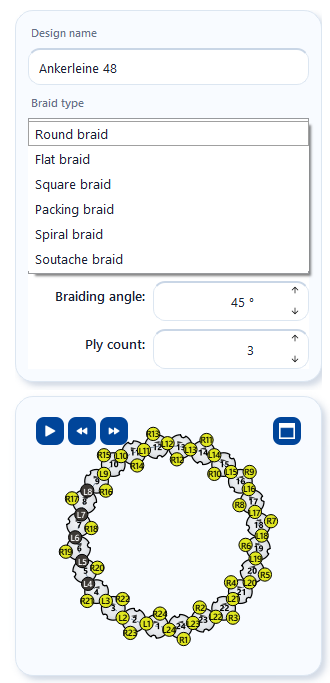
The card is compact and scrollable — on small screens you scroll within the panel to reach the lower fields.
Controls in detail
Design name
Free-text field for the designation of the design (placeholder "Enter design name"). The name appears in the document header, in the design library and on printouts. You can also change it later in the save dialog.
Braid type
The Braid type selection list determines the type of braid. The selection controls how the braid pattern is built, which bindings and numbers of carriers are permitted and what the Setup overview looks like. When you point at an entry, a tooltip explains the machine design.
| Braid type | Description |
|---|---|
| Round braid | Round braid with two counter-rotating runs (left run and right run) on a ring of horngears. The braid pattern shows the circumferential braid as a flat section; the Cylinder and 3D views show it round (see 3D view). |
| Flat braid | Flat braid (flat braid) with an open track — the carriers move back and forth between the two larger end gears. |
| Square braid | Square braid cross-section: 4 horngears with 4 to 18 slots carry 8 to 36 carriers on two tracks. Full, Square (rotatable) and 3D views. |
| Spiral braid | Spiral braiding machine with 4 horngears in a fixed outer ring: 12 carriers (3 slots per horngear, 3 tracks) or 20 carriers (5 slots, 5 tracks); setup 1 full / 1 empty. |
| Packing braid | Packing braiding machine with horngears in a grid. Use Track type to choose the family — 2-track, 3-track, 4-track or round — and Carriers to choose the size. Full, Square (rotatable) and 3D views. |
| Soutache braid | Two horngears, each with as many slots as there are carriers, on a figure-eight track: 3, 5, 7, 9 or 11 carriers (always odd), setup 1 full / 1 empty — optionally with two cores through the horngear axes. |
Changing the braid type adjusts the number of carriers
When you switch the braid type (or the binding), the Number of carriers field automatically jumps to the nearest permitted value of the new selection (see table below). The toolbar shows the matching view switches.
Braid binding
The Braid binding selection list defines the setup rule of the machine:
| Binding | Meaning |
|---|---|
| Normal setup 1-1 | Two-over-two binding 1-1: the default setup. |
| Half setup 1-3 | One-over-one binding 1-3: only every second possible position is occupied. |
| Tandem setup 2-2 | One-over-one tandem binding 2-2: the carriers run in pairs one behind the other. |
Fixed bindings
Packing, spiral and soutache braid have a setup that is fixed by design — the Braid binding list is then hidden. For Square braid, the tandem setup is only available for 8, 16, 24 and 32 carriers. If the design was opened from a braiding order, the order specifies the braid type and binding — the fields are then locked.
Track type and carriers (packing braid only)
| Field | Meaning |
|---|---|
| Track type | Family of the packing braiding machine: 2-track, 3-track, 4-track or round. The type defines the structure and the tracks. |
| Carriers | Number of carriers of the selected type. Sizes that the Designer cannot yet display are grayed out in the list with the suffix (in preparation). |
| Track type | Numbers of carriers |
|---|---|
| 2-track | 8, 12, 16, 24 |
| 3-track | 12 (3×3 horngears with 4 slots each), 18 (3×3 with 6 each), 20 (mixed horngears, PA3 1/20-280) — 24 in preparation |
| 4-track | 24 (4×4 with 6 each), 32 (4×4 with 8 each), 36 (mixed horngears, PA4 1/36-400), 52 (mixed horngears, PA4 1/52-320) |
| round | 12, 16, 24, 32 |
Number of carriers
Number field with step selection: the arrows jump directly to the next permitted value — which values these are depends on braid type and binding:
| Braid type | Binding | Permitted numbers of carriers |
|---|---|---|
| Round braid | Normal setup 1-1 | 12 to 144 in steps of 4 |
| Round braid | Tandem setup 2-2 | 12 to 144 in steps of 4 |
| Round braid | Half setup 1-3 | 6 to 72 in steps of 2 |
| Flat braid | Normal setup 1-1 | 9 to 145 in steps of 4 |
| Flat braid | Tandem setup 2-2 | 10 to 50 in steps of 4 |
| Flat braid | Half setup 1-3 | 5 to 73 in steps of 2 |
| Square braid | Normal setup 1-1 | 8, 12, 16, 20, 24, 28, 32, 36 |
| Square braid | Tandem setup 2-2 | 8, 16, 24, 32 |
| Square braid | Half setup 1-3 | 4, 6, 8, 10, 12, 14, 16, 18 |
| Spiral braid | fixed | 12 or 20 |
| Packing braid | fixed | per track type, see above |
| Soutache braid | fixed | 3, 5, 7, 9, 11 |
Upper limits only apply to the Designer
The upper limits in the table are display limits of the Designer — very large numbers of carriers could no longer be displayed graphically in a meaningful way. In the calculations you can also calculate with higher numbers of carriers.
Braiding angle
Number field for the braiding angle of the product in degrees: 20° to 80° in 1° steps, default value 45° (can be changed under Settings > Design). The angle changes the slope of the pattern in the braid pattern and has a live effect on the 3D view. The current value is also shown in the document header.
The field and slider show the angle in the configured braiding angle reference. The range 20° to 80° applies to the reference cross direction (Herzog); with the reference braid axis, the same range appears as 10° to 70°. The slider stays oriented so that moving to the right gives a larger displayed value; its tooltip shows an explanatory picture of the reference.
Ply count
Number field for the number of threads per carrier position (1 to 100). The ply count is shown in the braid pattern: from ply count 2, thin lines separate the yarns of each stitch, even if all yarns have the same color. From ply count 2, the yarn selector also appears in the toolbar, with which you give each yarn its own color — see plying colors. For coloring the threads and for their twist, see Coloring and twist.
Material Ø, covering and braid ض
For round and flat braids, three more rows appear directly below Ply count, one below the other. They are missing for mixed designs; you can switch them off under Settings > Design.
| Field | Meaning |
|---|---|
| Material Ø | Diameter of the single thread (yarn/wire) in mm, 0.00–100.00. Empty (–) = no value; the braid diameter then stays empty. Together with the TPM it sets the slope of the twist lines, see Twist; with the 3D material Rope it is the rope diameter. |
| Covering (for flat braid: Fill) | Covering of the braid in percent, default 70 % (can be changed in the settings). Controls the drawn thread thickness in the 3D view. |
| Braid Ø (for flat braid: Product width) | Display: the calculated braid diameter from number of carriers, braiding angle, ply count, material diameter and covering — the same calculation as the Diameter page. Display only; the drawing remains not to scale. |
If several design windows are open, the fields show the values of the active window.
Insert cores (2 core threads) — soutache braid only
Checkbox: two core threads run through the axes of the two horngears and are braided over — the classic soutache cord with two beads. Switch off for braids without cores. In the 3D view the cores lie inside the braid.
Related pages
- Coloring and twist — color the carriers of the configured braid and give them a twist
- Setup and track animation — what the selected configuration looks like on the machine
- 3D view — projections and real 3D model
- Saving and printing — store the finished design
- Braiding order — braid type, binding and number of carriers in the order
- Design (settings) — defaults for new designs