Parameter Explorer
Reference — All currently active program values with value, source and description
What you use this area for
The Parameter Explorer (also called "Parameter Explorer" in the app) shows all program values that Herzog CAB currently holds active in the context in a single place – with their current value, their origin and a description. It is above all an expert and diagnostic tool for understanding how values relate between order, calculations and Designer, and for finding exactly the program values that you want to use, for example, as placeholders in a print template.
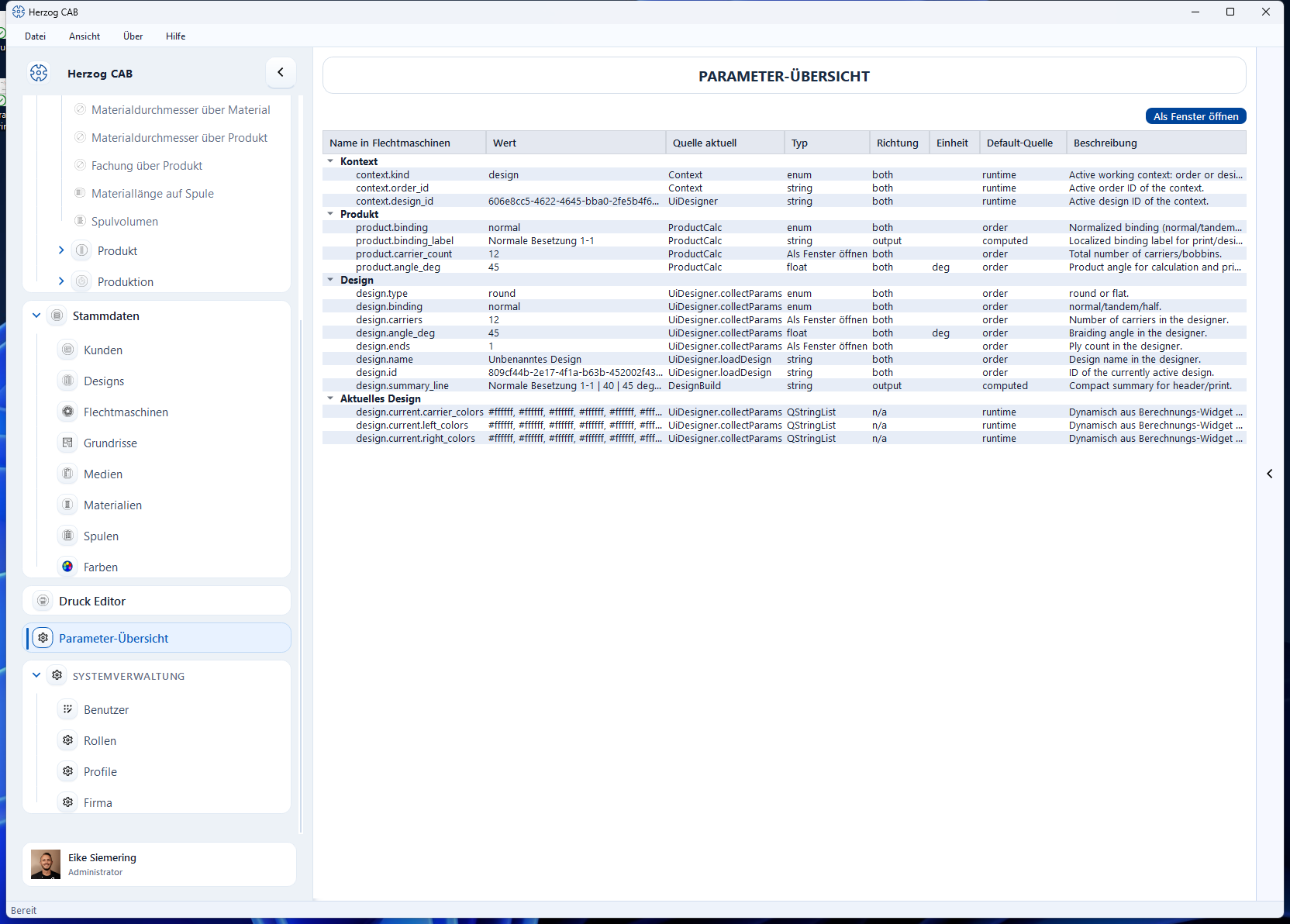
The screen at a glance
You reach the Parameter Explorer via the navigation item System administration > Parameter Explorer. Users without administration rights who are allowed to open the overview find the Parameter Explorer item at the very bottom of the navigation (see Navigating the app). At the top left is the title line "Parameter Explorer", on the right the Open in window button, and below it the tree table with all parameters, grouped by area.
Controls in detail
Open in window
Additionally opens the Parameter Explorer in its own, independent window (e.g. to drag it onto a second screen while you continue working elsewhere). Clicking again only brings an already open window back to the foreground instead of opening a second one.
Tree table
The parameters are grouped by area and shown expanded, e.g. Context, Order, Customer, Machine, Design, Current design, Design library, Calculations (with one subgroup per recently used calculation) and Runtime values for values that were taken over at runtime from a calculation module. Only parameters for which a value currently exists appear in the list.
| Column | Meaning |
|---|---|
| Parameter ID | Unique technical name of the parameter (e.g. winding.line_speed_m_per_min). |
| Value | Current value. If it has been changed without the associated calculation having been run again yet, it appears in italics with the suffix "(dirty)". |
| Current source | Where the current value comes from (e.g. a calculation, the order or a manual input). |
| Type | Data type of the parameter (int, float, bool, string, enum or string_list). |
| Direction | Whether the parameter is an input (input), a result (output) or both (both). |
| Unit | Unit of measurement of the value, if any. |
| Default source | Where the default value comes from. |
| Description | Short explanation of the parameter. |
The overview updates automatically as soon as a parameter value changes – manual reloading is not necessary.
Permission required
To open the Parameter Explorer, you need the Open Parameter Explorer permission (group "Expert tools"). For more information, see Roles.
Rarely needed in everyday work
Normal operation takes place via the calculations and the braiding order. The Parameter Explorer helps if you want to trace a result, check an unusual combination of values or look up the technical name of a value for a print template.
Related pages
- Elements and placeholders – use program values as placeholders in print templates
- Calculations – the calculators from which many parameters originate
- Roles – manage permissions