Bobbin winding machines
Reference — Create and maintain bobbin winding machines of the series SP, SPA and HLM: master data, winding technology, dimensions and documents.
What you use this area for
Under Master data > Bobbin winding machines you create the bobbin winding machines of your plant. Unlike braiding machines, bobbin winding machines have no carriers or braid type, but a Winding technology (winding heads, speed, traversing etc.). The master data is used in winding orders, in the winding calculations, in the Machine Fleet and in the Factory Planner.
New in version 1.4.5
The bobbin winding machine master data is part of the bobbin winding machine integration. The list is structured just like that of the braiding machines; for creating and editing, however, a separate dialog with winding-specific fields opens.
The screen at a glance
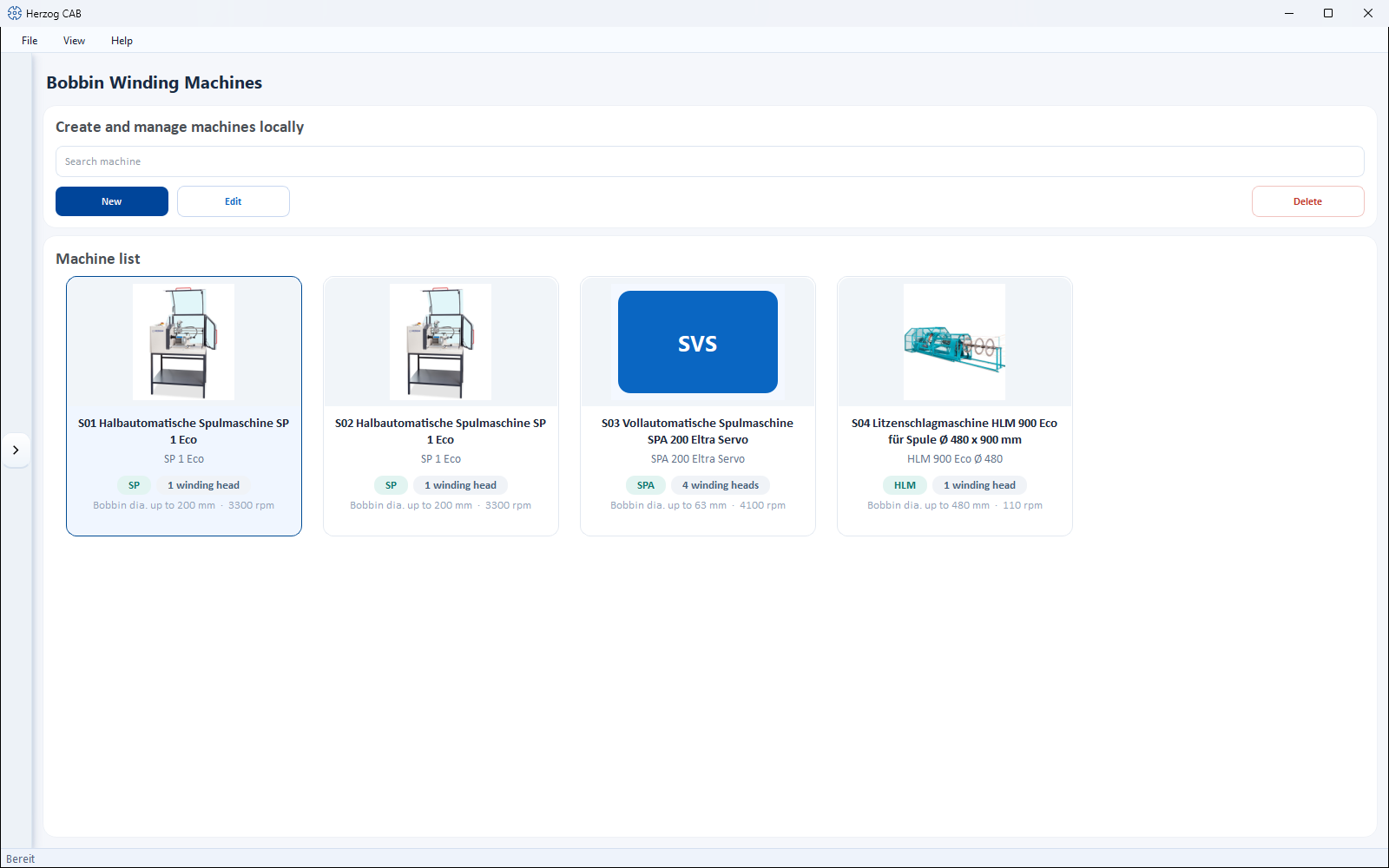
At the top is a toolbar, below it the Machine list as cards. Each card shows image, series and the most important information: Winding heads, Bobbin dia. (maximum bobbin diameter) and rpm (maximum speed).
Toolbar
| Button | Effect |
|---|---|
| Search | Filters the list. |
| New | Opens the dialog Create new bobbin winding machine (see below). |
| Edit | Opens the selected machine for editing. |
| Delete | Removes the selected machine(s) with confirmation prompt. |
Right-clicking a card opens a context menu with Open, Edit, Duplicate and Delete.
The "Create new bobbin winding machine" dialog
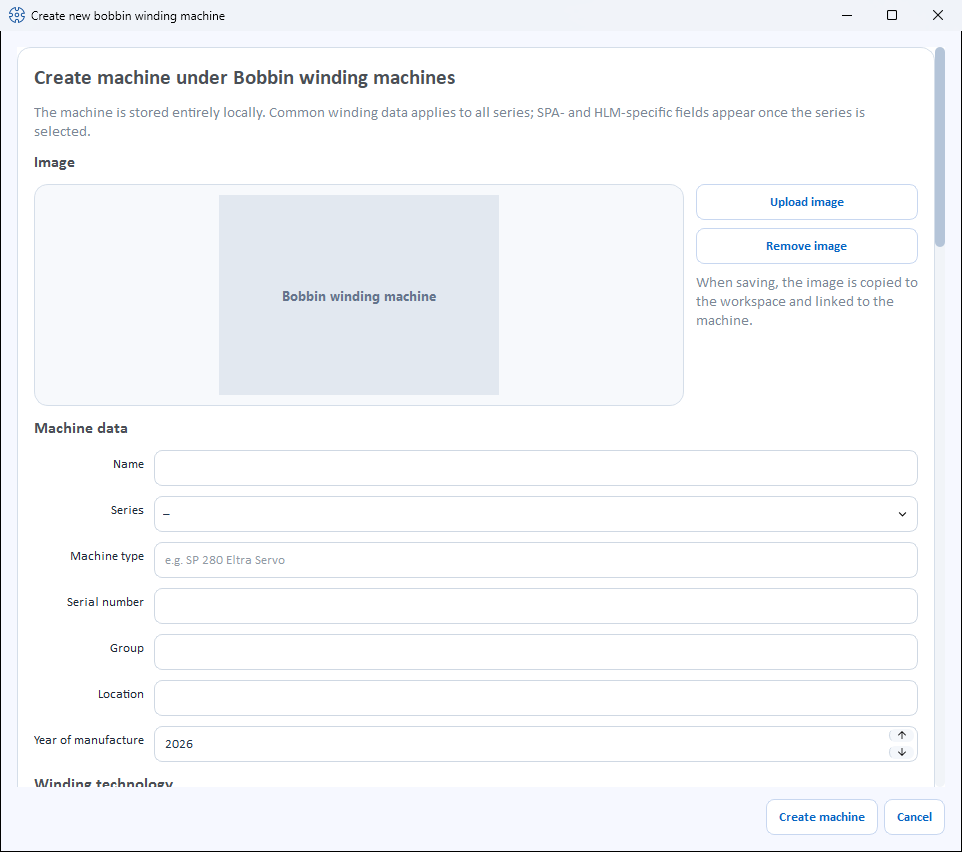
The dialog is divided into sections from top to bottom.
Image
- Upload image – selects a machine image from the Media library.
- Use catalogue image – appears only as long as the machine has no image and its Machine type matches a model from the Herzog catalogue. Loads the catalogue image from the internet (from version 2.1.0, not in Herzog CAB Designer).
- Remove image – removes the image again.
Machine data
| Field | Meaning |
|---|---|
| Name | Display name of the machine. Required field. |
| Series | SP, SPA or HLM (required field). The series controls which additional sections appear (see below). |
| Machine type | Type designation (e.g. "SP 280 Eltra Servo"). |
| Serial number | Serial number of the machine. |
| Group | Freely assignable grouping. |
| Location | Hall/plant/department. |
| Year of manufacture | Year of manufacture (or not set). |
Winding technology
This information applies to all series.
| Field | Meaning |
|---|---|
| Winding heads | Number of winding heads (1–64). |
| Bobbin diameter (min–max) | Smallest and largest bobbin diameter that can be accommodated, in mm. |
| Winding length (min–max) | Smallest and largest winding length in mm. |
| Speed (min–max) | Speed range in rpm (revolutions per minute). |
| Traversing | Traverse system: UHING roll ring drive (mechanical), Eltra servo (electronic) or Cross spindle. |
| Winding type | Parallel winding, Cross winding or Precision winding. |
| Speed control | Two checkboxes: Constant spindle speed and/or Constant yarn speed. |
| Yarn tension | Type of yarn tension: None, Disc brake, Yarn tension monitoring or Winding feeder (electronically controlled). |
| Control | Mechanical or PLC with touch panel. |
| Drive | Standard motor or Servo motor with absolute encoder. |
| Traverse step (min–max) | Smallest and largest traverse step in mm. |
| Max. traverse width | Maximum traverse width in mm. |
| Max. bobbin weight | Maximum weight of a full bobbin in kg. |
| Setup time per order | Setup time in minutes that occurs once per winding order. Default for the winding time projection in the winding order; can be overridden there per order. |
| Loading time per bobbin | Time in minutes for the bobbin change per bobbin — with fully automatic bobbin change, the changing time of the automatic unit. Also a default for the winding order. |
| Counters | Checkboxes Meter counter, Layer counter, Operating hours counter, Product database. |
| Monitoring | Checkboxes Yarn break monitoring, Knot monitoring, Idle run monitoring. |
| Materials | Checkboxes for processable materials: Yarn, Wire, Carbon fiber, Strand, Braid. |
| Matching bobbins | Multiple selection from the Bobbin Database. |
Automatic bobbin change (SPA)
This section appears only when SPA is selected as the series.
| Field | Meaning |
|---|---|
| Bobbin change | Checkboxes Automatic bobbin change, Empty bobbin magazine, Full bobbin tray. |
| Yarn handling | Checkboxes Yarn cutter, Yarn catcher. |
Strand laying (HLM)
This section appears only when HLM is selected as the series.
| Field | Meaning |
|---|---|
| Lay length (min–max) | Smallest and largest lay length in mm. |
| Strand diameter (min–max) | Smallest and largest strand diameter in mm. |
| Lay direction | S-lay, Z-lay or S- and Z-lay. |
Accessories
The accessories of the bobbin winding machine as checkboxes — as for the braiding machines: suggestions from the Herzog catalogue (if the machine type matches a catalogue model, grouped e.g. by Monitoring and control, Bobbins and formats) and own accessories via the field below the list with Add. Whatever is checked is saved.
Dimensions
Length, width and height in cm. Length and width determine the footprint of the machine in the Factory Planner.
Documents
As for the braiding machines, you can store documents (columns Category, File, Description). When adding, you choose one of the categories:
- Operating manual
- Data sheet
- Maintenance
- Spare parts
- Other
The buttons below are Add document, Open and Remove document.
Save
At the bottom, you complete the dialog with Create machine or discard it with Cancel. When editing, the button is called Save. Name and series must be filled in.
The series
| Series | Designation |
|---|---|
| SP | Semi-automatic bobbin winding machine |
| SPA | Fully automatic bobbin winding machine (with automatic bobbin change) |
| HLM | Strand laying machine |
Related pages
- Winding order – assign a bobbin winding machine to an order
- Winding calculations – winding time, yarn speed, bobbin capacity and more
- Bobbins – assign bobbin formats
- Braiding machines – master data of the braiding machines
- Take-up units · Pay-off units · Creels – the other machine kinds
- Herzog catalogue – take over bobbin winding machines from Herzog
- Machine Fleet – operating overview of all machines