Creels
Reference — Create and maintain pay-off creels and pay-off racks: pay-off positions, pay-off, package type and size, yarn tension, monitoring, material, accessories and documents.
What you use this area for
Under Master data > Creels you create the pay-off creels and pay-off racks of your plant. A creel feeds yarns, monofilaments, wires or core material from its pay-off positions into a bobbin winding machine or braiding machine. In the Machine Fleet, creels have their own filter.
New in version 2.1.0
Creels are a separate machine kind. The list and dialog are structured like those of the take-up units.
The screen at a glance
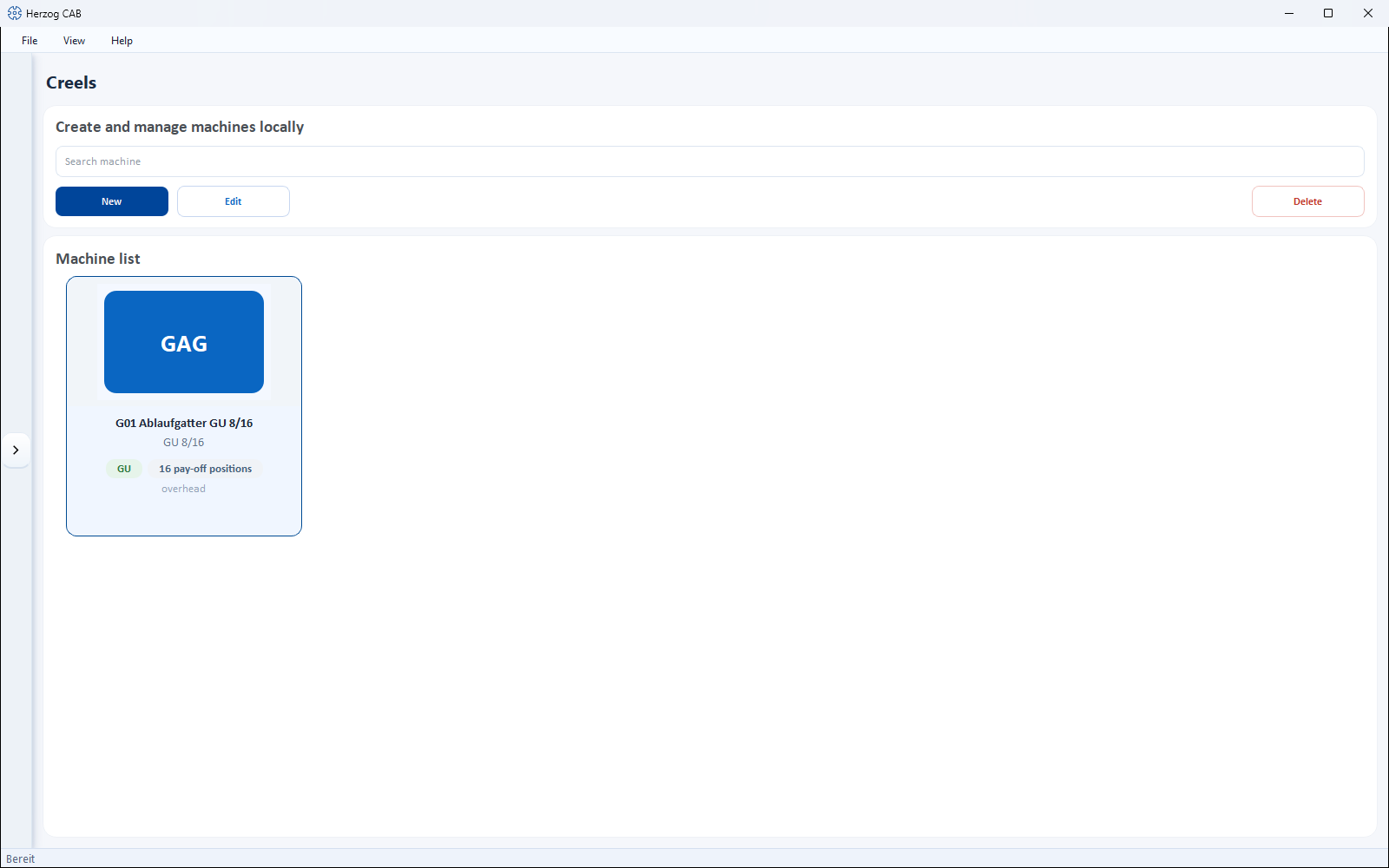
At the top is a toolbar, below it the Machine list as cards. Each card shows image, series (without series: Creels), … Pay-off positions as well as the pay-off (overhead or rolling) and Package up to Ø … mm, if stored.
Toolbar (Search machine, New, Edit, Delete), double-click and context menu (Open, Edit, Duplicate, Delete) work as for the take-up units. The quickest way to create Herzog creels is via the Herzog catalogue (tab Creels).
The "Create new creel" dialog
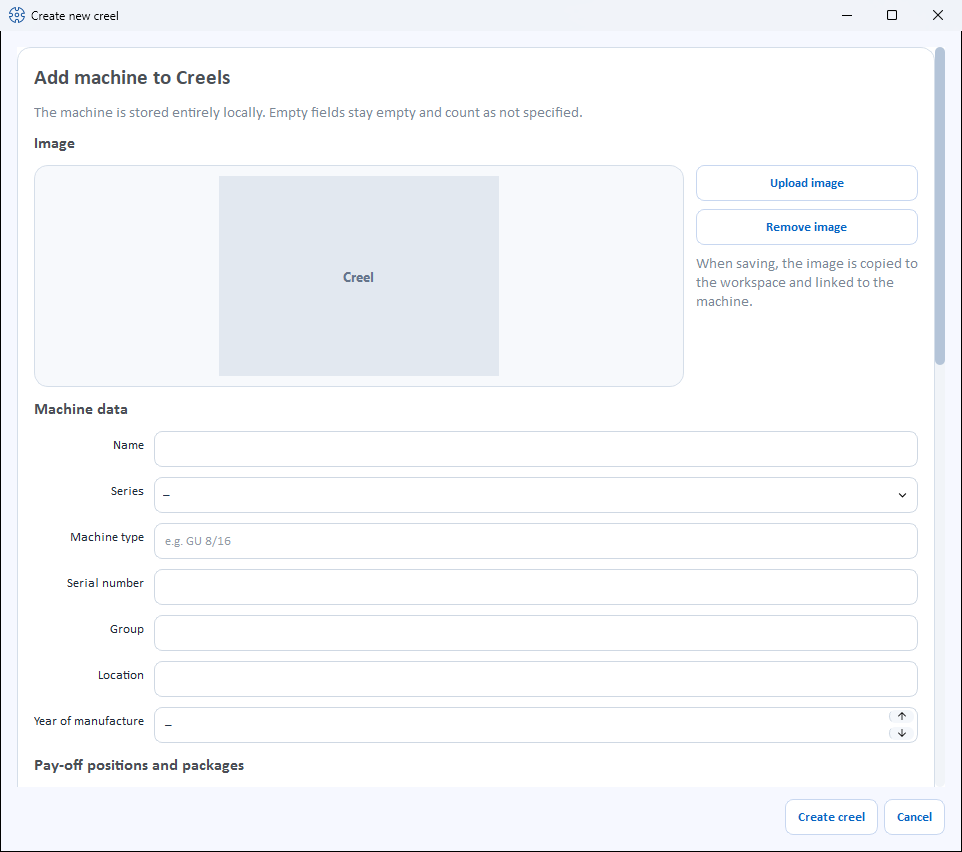
The dialog is divided into sections from top to bottom. Empty fields remain empty and count as not stored.
Image
- Upload image – selects a machine image from the Media library.
- Use catalogue image – appears only as long as the creel has no image of its own and its Machine type matches a model from the Herzog catalogue (internet connection required).
- Remove image – removes the image again.
Machine data
| Field | Meaning |
|---|---|
| Name | Display name of the machine. Required field. |
| Series | One of the series (see below) or –. |
| Machine type | Type designation, e.g. GU 8/16. If the field is left empty, the series is saved as the machine type. |
| Serial number | Serial number of the machine. |
| Group | Freely assignable grouping. |
| Location | Hall/plant/department. |
| Year of manufacture | Year of manufacture (or –). |
Pay-off positions and bobbins
| Field | Meaning |
|---|---|
| Pay-off positions | Total number of pay-off positions. |
| of which active | How many positions run at the same time. Example GU 4/8: 4 positions run, the remaining 4 are ready for a quick cop change. |
| Pay-off | overhead or rolling (or –). |
| Drive | Checkbox motor-driven. |
| Package type | Checkboxes Cops, Cardboard tube, DIN drum, Drum. |
| Max. package diameter | Largest package diameter in mm. |
| Max. package length | Largest package length in mm. |
| Max. bobbin weight | Largest bobbin weight in kg. |
Design
| Field | Meaning |
|---|---|
| Yarn tension | Checkboxes Disc brake, Magnum brake, Band brake, Wrap brake, Crocodile brake, Magnetic brake, Dancer arm, contactless control. |
| Monitoring | Checkboxes Thread break, Blockage, Standstill. |
| Material | Checkboxes for processable materials: Yarn, Finest yarn, Monofilament, Wire, Glass fiber, Carbon fiber, Core material, Axial threads, Knitted tube. |
Accessories and documents
Accessories as checkboxes (catalogue suggestions and own accessories) and Documents (categories Operating manual, Data sheet, Maintenance, Spare parts, Other) work as for the take-up units.
Save
At the bottom, you complete the dialog with Create creel or discard it with Cancel. When editing, the button is called Save. Without a name, Please enter a name. appears; if more positions are active than exist, the dialog reports Active pay-off positions: more than pay-off positions in total.
The series
| Series | Designation |
|---|---|
| GU | Overhead pay-off creel |
| GR | Rolling pay-off creel |
| GRP | Rolling pay-off creel with pneumatic stop brake |
| GRG | Rolling pay-off creel, contactless control |
| GM | Motor-driven pay-off creel |
| GMG | Motor-driven pay-off creel with dancer per position |
| GS | Pay-off creel for knitted tubes |
| EGA | Pay-off creel for cardboard tubes |
| VG | Variation creel |
| AL | Pay-off rack |
Related pages
- Pay-off units · Take-up units · Bobbin winding machines · Braiding machines
- Herzog catalogue – take over creels from Herzog
- Machine Fleet – operating overview of all machines