Winding order editor
Reference — Create and edit a winding order: link to the braiding order, material and bobbins, color breakdown, winding parameters, bobbin winding machines with distribution, winding time and production period.
What you use this area for
A Winding order plans the work of the winding department: how many bobbins are wound with which material and which yarn length, on which bobbin winding machines, with which winding parameters — and how long it takes. Usually the winding order is the preparation step ("step 1") of a braiding order: the wound bobbins are then inserted into the carriers of the braiding machine. A winding order can also stand alone, without a linked braiding order — in that case you maintain the color breakdown and target values by hand.
flowchart LR
  A[Braiding order] -->|Create winding order| B[Winding order<br>Step 1: bobbins]
  B -->|wound bobbins| C[Production on the<br>braiding machine]
You reach the editor in three ways:
- in the Order Overview via New order > New winding order (empty winding order),
- via Create winding order with a braiding order selected (prefilled, linked winding order),
- via Open or a double-click on a winding order card.
The screen at a glance
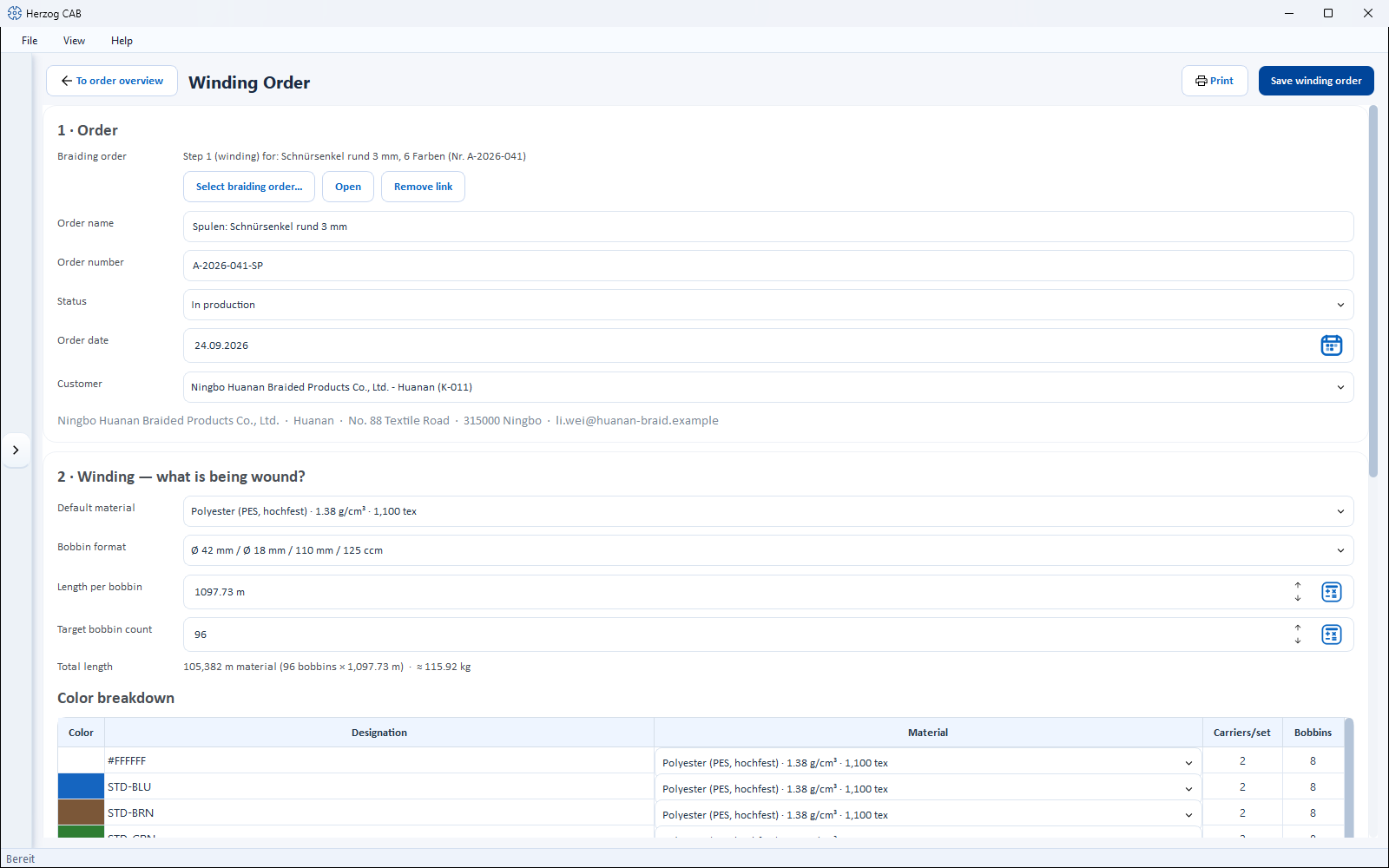
All controls of the header are in one line: on the far left, To order overview (with an arrow icon) takes you back to the Order Overview, next to it is the title "Winding order". On the right are Print (opens the print output with the standard winding order template) and Save winding order. If a colleague is editing the winding order right now, it is read-only for you (banner Being edited – read only); if they have saved it in the meantime, Herzog CAB asks when saving — see Several users on the same workspace folder.
The editor is one scrolling page with three numbered cards — from top to bottom in the order in which you plan:
| Card | Content |
|---|---|
| 1 · Order | Linked braiding order, name, number, status, date, customer. |
| 2 · Winding — what is being wound? | Default material, bobbin format, length per bobbin, target bobbin count, total length, color breakdown, winding parameters (collapsible). |
| 3 · Machines and schedule | Winding time per bobbin, bobbin winding machines with distribution, winding time projection, production period. |
Card 1: Order
Linked braiding order
Shows for which braiding order this winding order produces the bobbins — e.g. Step 1 (winding) for: Abschleppseil (Nr. A-2026-015). Without a link it shows No braiding order linked; if the linked order has been deleted, this is also shown.
| Button | Effect |
|---|---|
| Select braiding order... | Opens a list of all braiding orders. After the selection (double-click or Link), Herzog CAB offers to transfer customer, material, bobbin format, production date and target values (target bobbin count, length per bobbin) from the braiding order (Apply data) — an order name, number and winding parameters already entered are kept. |
| Open | Opens the linked braiding order in the braiding order editor. Only active if the linked order exists. |
| Remove link | Removes the link. The winding order remains with all its values and switches to manual mode (see color breakdown). |
Basic data
| Field | Meaning |
|---|---|
| Order name | Freely chosen name, e.g. Bobbins for rope order 4711. |
| Order number | Your order number. For winding orders created from a braiding order, it is preset to <number>-SP. |
| Status | Draft, Released, In production or Completed — same meaning as for the braiding order. |
| Order date | Date of the order, with calendar selection. |
| Customer | Selection list with No customer, the customers from the customer master data and — if the order contains customer data that does not match any master data entry — Applied: <name>. Below it, an info line summarizes the selected customer. |
Card 2: Winding — what is being wound?
The fields are in the order of the calculation chain: material and bobbin format determine the length per bobbin, length and total demand determine the target bobbin count.
| Field | Meaning |
|---|---|
| Default material | Material from the material master data. Drives bobbin capacity, weight and total length; in the color breakdown it can be chosen differently per row. Entries that no longer exist are shown in the field as … (no longer available). |
| Bobbin format | Bobbin format from the bobbin master data, shown with dimensions and volume. |
| Length per bobbin | Yarn length per bobbin in meters. The calculator icon opens the Bobbin capacity calculation, preset with bobbin format and material; Apply writes the result back. |
| Target bobbin count | How many bobbins are to be wound in total; 0 is shown as not set. Preset when transferring from the braiding order (from bobbin sets and active carriers). The calculator icon opens Target bobbin count from total length (see below). |
| Total length | Display: n m material (bobbins × length), supplemented by the material weight ≈ n kg (from length and fineness of the material). |
For a winding order created from the braiding order, material and bobbin format are already preset to match: the same material is wound onto the same bobbin format that will later run on the braiding machine.
"Target bobbin count from total length" calculator
| Element | Meaning |
|---|---|
| Required total length | Total material length to be wound in meters (e.g. 5,000 m). |
| Bobbins per bobbin set | How many bobbins one set on the braiding machine needs; From braiding machine… takes the active carriers of a braiding machine from the master data. |
| Result | Results in n bobbins — the target bobbin count is set to n and That corresponds to m bobbin sets (k bobbins each). Apply writes the target bobbin count. |
A prerequisite is an entered Length per bobbin.
Color breakdown
Table showing how many bobbins are to be wound per color and material. It works in two modes:
| Linked braiding order | Without link (manual) | |
|---|---|---|
| Where the rows come from | From the carrier table of the design in the braiding order; Update from braiding order reads them in again. | You create the rows yourself (Add row…, Remove row). |
| Carriers/set column | Display: carriers of the design with this color. | hidden |
| Bobbins column | calculated from carriers per set and bobbin sets, read-only | editable — absolute number of bobbins per row |
| Total row | Carriers/set: n of k (⚠ if the total does not match the machine) · Bobbins: m | Total bobbins: m · corresponds to s bobbin sets (k each) |
| Column / element | Meaning |
|---|---|
| Color | Color field. Double-click (or Add row…) opens the Choose color selection from the color master data or Custom color… via the color picker. If the design has plying colors, each combination of yarn colors gets its own row; the color field shows yarn 1, names, identifiers and Pantone are shown per yarn separated by " / ". |
| Designation | Color designation according to the Display selection. |
| Material | Selection list per row; the default is the default material of the order. |
| Display | Color designation as Color name, Identifier, Hex value or Pantone. The setting is shared with the carrier table in the braiding order. |
| Warning | If the bobbin total differs from the target bobbin count, this is shown directly next to the total. |
Automatic synchronization
When you open a linked winding order, the color breakdown updates automatically from the braiding order — but only as long as you have not changed the table by hand. Manually adjusted tables remain untouched; for those there is the Update from braiding order button.
Winding parameters (optional)
The section is collapsed; Show winding parameters (optional) opens it (Hide winding parameters closes it again). If values are set, it is already expanded when the order is opened. All fields are optional; 0 or the first entry stands for not set. The values are used in the winding time (card 3).
| Field | Meaning / selection |
|---|---|
| Winding type | not set, Parallel winding, Cross winding, Precision winding. |
| Traverse step | Traverse step in mm. |
| Yarn tension | Yarn tension in cN. The calculator icon opens the Yarn tension calculation, preset with the selected material; Apply writes the guide value back. |
| Speed control | not set, Constant spindle speed, Constant yarn speed. |
| Spindle speed | Revolutions per minute (rpm) of the spindle that carries the bobbin. |
| Yarn speed | Speed in m/min. The calculator icon opens the Yarn speed calculation (conversion speed ↔ yarn speed via the winding diameter); Apply writes the result back into yarn speed and spindle speed. |
| Winding direction | not set, S-winding, Z-winding. |
| Remark | Free text with notes for the winding department. |
Card 3: Machines and schedule
Winding time per bobbin
| Element | Meaning |
|---|---|
| Winding time per bobbin | Time in minutes for one bobbin. Empty = Herzog CAB determines it itself: from length ÷ yarn speed (if the yarn speed is set) or estimated from spindle speed and mean winding Ø (if only the spindle speed and the bobbin format are known). An entered value counts as manually specified and overrides both. The source is shown below the field: Winding time per bobbin: 4:12 (from length ÷ yarn speed). |
If no winding time can be determined, a message names the options: yarn speed, spindle speed with bobbin format, winding time per bobbin or a speed per machine in the table.
Bobbin winding machines (distribution table)
A winding order can be distributed across several bobbin winding machines. Each row is one machine:
| Column | Meaning |
|---|---|
| Machine | Bobbin winding machine from the bobbin winding machine master data; braiding machines do not appear here. Machines that no longer exist are marked. |
| Winding heads | Number of winding heads of the machine (from the master data). |
| Bobbins | Number of bobbins this machine winds — editable directly by double-click. |
| Setup time (min) | One-off setup time per order; preset from the master data of the machine, can be overridden here. |
| Loading per bobbin (min) | Time for the bobbin change per bobbin; preset from the master data. |
| Speed (m/min) | Optional yarn speed for this machine only; empty = order value. A value here takes precedence over the global winding time. |
| Time | Calculated time of this machine: setup time + cycles × winding time per bobbin + bobbins × loading, where one cycle winds as many bobbins as the machine has winding heads. |
| Button | Effect |
|---|---|
| Add machine… | Opens the Add bobbin winding machine selection (cards with name and winding heads); machines already assigned are missing from the list. The new machine gets the bobbins not yet distributed. |
| Remove | Removes the selected machine from the table. |
| Distribute bobbins evenly | Distributes the target bobbin count across all machines in proportion to their winding heads — each machine then runs the same number of cycles. Prerequisite: at least one machine and a target bobbin count. |
| Winding time details… | Opens the info calculation Winding time, preset with the values of the order (for information — there is nothing to apply here). |
Below the table, a time tile summarizes: the time per machine, below it Total duration (parallel) — the longest machine time, because the machines run at the same time — and Total material weight. A warning appears if the assigned bobbins differ from the target bobbin count (⚠ Assigned bobbins (n) differ from the target bobbin count (m).) or no machine has been assigned yet.
Production period
| Field | Meaning |
|---|---|
| Production from | Planned start of winding, with calendar selection. When transferring from a braiding order, it is scheduled backwards: the end of winding is at the start of braiding. |
| Production until | Planned end. Apply from estimate sets it to start + total duration, converted using the Production hours per working day from the settings; weekends are skipped. |
If the end of winding is after the braiding start of the linked braiding order, the editor warns you — the bobbins would not be ready in time. The warning does not block saving.
Saving
Save winding order (top right) saves the order; a short success message confirms the save. Prerequisite: at least an order name or an order number has been entered — otherwise a message points this out. If you leave the editor with unsaved changes, Herzog CAB asks (Save, Don't save, Cancel). Saving and changing the link require the right to edit orders — see Roles and rights.
Related pages
- Order Overview — search, duplicate, delete winding orders
- Braiding order editor — the order the bobbins are wound for
- Print — print a winding order with the winding order template
- Planning bobbins for a braiding order — the workflow as a guide
- Winding calculations — winding time, bobbin capacity, yarn tension and more
- Bobbin winding machines · Materials · Bobbins — the related master data
- Winding order in the web app