General: language, display, privacy, production planning and braiding angle
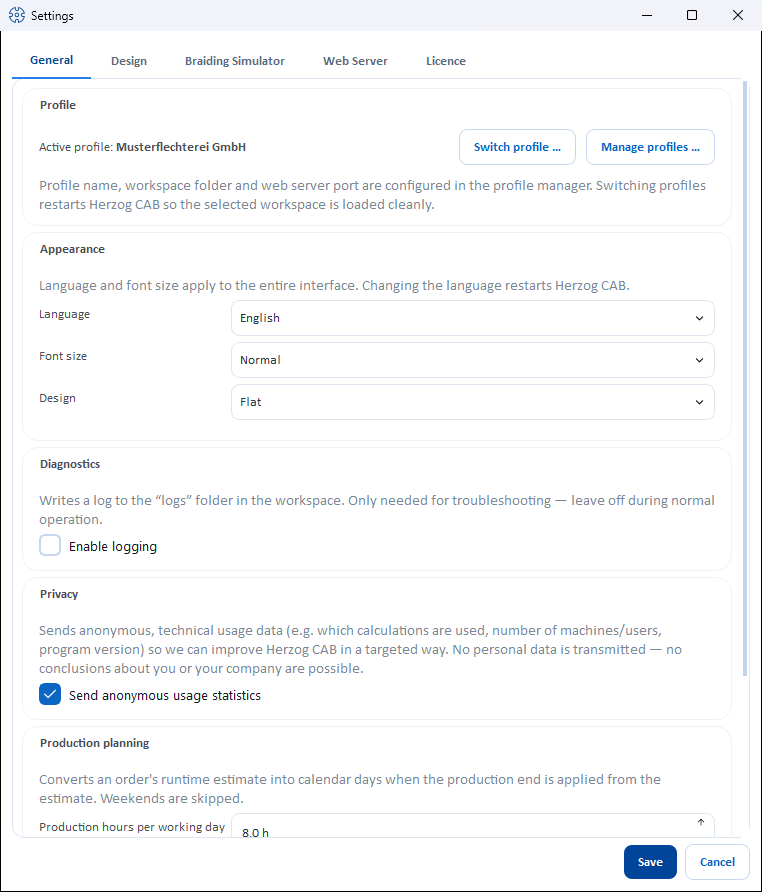
Reference — “General” tab of the Settings dialog: profile quick access, language, font size, design, diagnostic log, anonymous usage statistics, production planning and reference of the braiding angle.
What you use this area for
In the General tab (File > Settings) you set the language and the appearance of the entire interface, enable the diagnostic log if required, decide on the anonymous usage statistics and define how Herzog CAB measures the braiding angle.
Controls in detail
Profile
The Profile card shows the active profile and offers the Switch profile … and Manage profiles … buttons. Details can be found on the Profiles (workspaces) page — profile name, workspace folder and web server port are maintained there.
Display
| Setting | Options | Effect |
|---|---|---|
| Language | German, English, Italian, Spanish, Polish, Chinese | Language of the entire interface. |
| Font size | Normal, Large | Larger font for better readability on large or distant screens. Takes effect immediately as a preview when switched. |
| Design | Flat, Neumorphic | Appearance of the interface (flat surfaces or soft, three-dimensional cards). Takes effect immediately as a preview when switched. |
A language change restarts Herzog CAB
So that all texts are loaded completely in the new language, a language change restarts the program after Save. Save open entries beforehand.
Diagnostics
| Setting | Effect |
|---|---|
| Enable logging | Writes a log to the logs folder in the workspace (file logs\herzogcab.log, see Storage location). The note next to it: "Only needed for troubleshooting — leave off during normal operation." |
Diagnostics only when needed
The log is only needed for troubleshooting — leave it switched off during normal operation. Support may ask you to switch it on temporarily.
Privacy
| Setting | Effect |
|---|---|
| Send anonymous usage statistics | Sends anonymous, technical usage data so that Herzog CAB can be improved in a targeted way. |
Only technical information is sent, for example:
- which functions and calculations are used,
- how often printing or exporting takes place,
- the number of machines and users created,
- program version, operating system and language,
- how long the program is used.
No personal data is transmitted — it is not possible to draw conclusions about you or your company.
Your decision, can be changed at any time
At the first program start, Herzog CAB asks once for your consent ("Improve Herzog CAB" dialog). You can change your choice here at any time. In the Trial version the statistics are switched on by default but can also be switched off here.
Production planning
| Setting | Effect |
|---|---|
| Production hours per working day | How many hours per working day are spent producing (1–24 h in half-hour steps, default 8 h). Herzog CAB uses this to convert the runtime estimate of an order into calendar days when you choose Apply production end from estimate in the braiding order or winding order. Weekends are skipped. |
Braiding angle
The braiding angle can be specified in two ways: Herzog measures it against the cross direction of the braid, the technical literature mostly against the braid axis. The two values add up to 90° — an angle of 30° to the cross direction is 60° to the braid axis; at 45° both are equal. With this card you define in which reference Herzog CAB displays the braiding angle and expects entries.
| Setting | Options | Effect |
|---|---|---|
| Measure braiding angle | To the cross direction (Herzog) (default), To the braid axis (technical literature) | Reference of all braiding angle displays and entries in the program. The tooltip on each entry shows an explanatory image of the reference. Applies from Save; open pages show the new reference immediately. |
What the reference changes — everywhere only the display and input, not the stored data:
- Calculations: every braiding angle field and every braiding angle result, e.g. in Braiding angle, Braiding angle from take-up, Braid density, Product diameter, Product weight, Core-cover product, the hollow braid pages and the printout of the calculation pages. In the hollow braid diagram, the reference line is horizontal for cross direction and vertical for braid axis.
- Designer: the Braiding angle field and slider in the parameter panel and the default for new designs in the Design tab. The slider remains oriented so that moving it to the right gives a larger displayed value.
- Order: the Braiding angle field in the braiding order.
- Braiding Simulator: braiding angle in the braid preview, see Braiding angle reference.
- Printouts: design printout and placeholders for the braiding angle in print templates, the angle column of the design library and the mobile view of the web server.
Herzog CAB always stores the braiding angle internally in the same way. If you change the reference, nothing is converted or overwritten — orders, designs and print templates show the same angle, just in the other reference. The field labels do not name the reference; if you point the mouse at a braiding angle field, the tooltip names both values, e.g. 30.0° to the cross direction (Herzog) = 60.0° to the braid axis (technical literature).
With a customer account, the choice applies to your user
If you sign in via the customer account, Herzog CAB additionally stores the choice with your user in the account and fetches it from there at program start — so it applies on every computer you sign in to, and in the web app. Without a connection, the last known choice applies. For dongle installations, the setting applies to this computer.
Related pages
- Settings (dialog) — overview of all tabs
- Profiles (workspaces)
- Storage location — where the workspace and log are stored
- Braiding angle (calculation)