Braiding machines
Reference — Create and maintain the plant's braiding machines: technical data, image, permitted bobbins and documents. The data is used in the Machine Fleet, Factory Planner, orders and calculations.
What you use this area for
Under Master data > Braiding machines you create and manage the braiding machines of your plant. For each machine, Herzog CAB stores technical data, optionally an image, view images for the hall, and documents such as take-up tables or operating manuals. This master data is used in the Machine Fleet, in the Factory Planner, in orders and in the calculations.
Master data here – operating status in the Machine Fleet
On this page you maintain the master data of the machine (what it can do). You see the current operating status (which orders are running, status light) in the Machine Fleet; you arrange the machines on a hall floor plan in the Factory Planner.
The screen at a glance
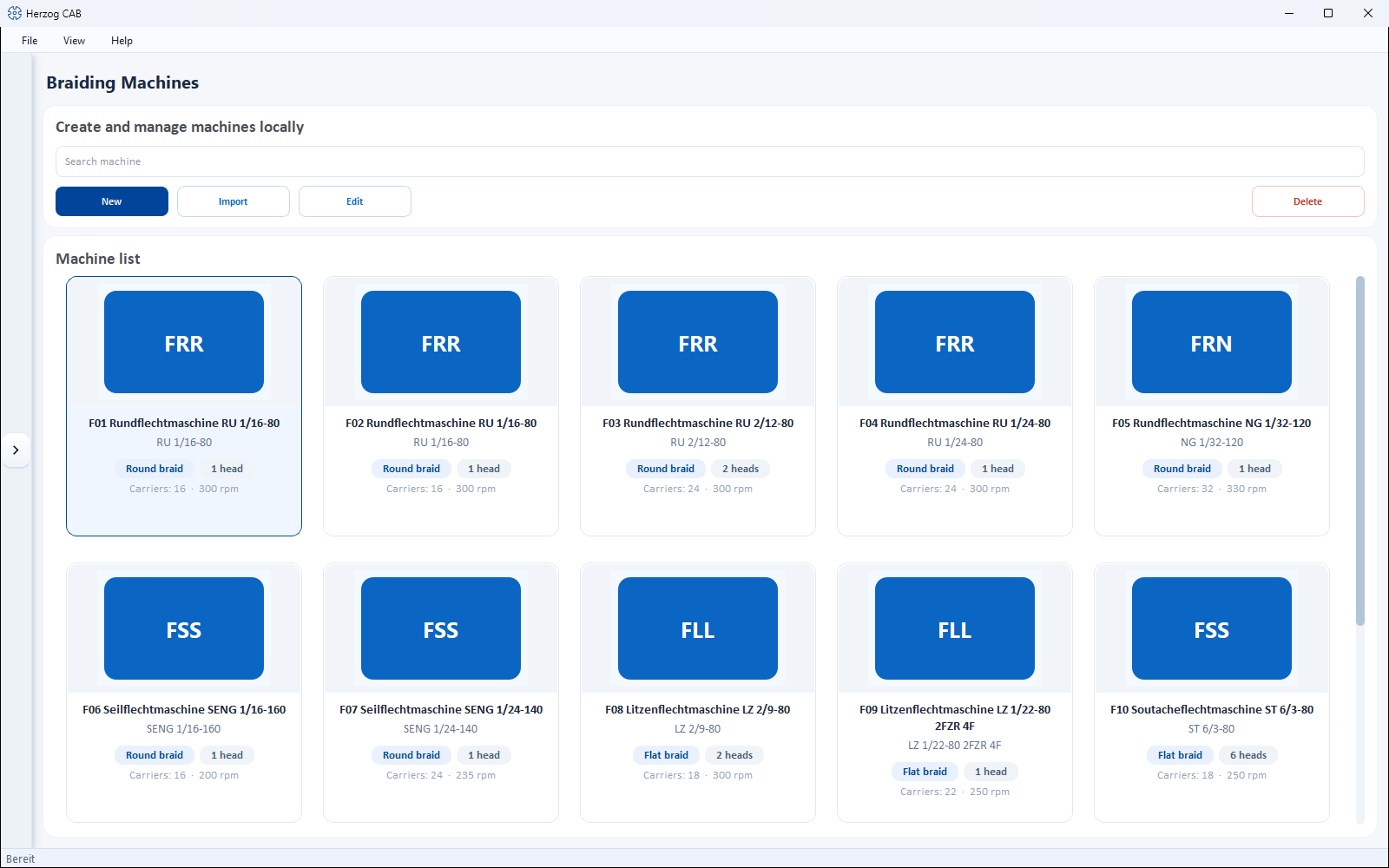
At the top there is a toolbar, below it the Machine list as cards. Each card shows image, category, braid type, heads and the most important technical data (number of carriers, speed).
Toolbar
| Button | Effect |
|---|---|
| Search | Filters the list by name, type, category or location. |
| New | Opens the dialog Create new machine (see below). |
| Import | Takes over machines from a CSV file (images in the same folder as the CSV). |
| Compare | Shows at least two selected machines side by side in a table, see Compare machines. |
| Edit | Opens the selected machine for editing. |
| Delete | Removes the selected machine(s) with confirmation prompt. |
Right-clicking a card opens a context menu with Open, Edit, Duplicate and Delete. Open shows the machine details (metadata and technical information, plus take-up and accessories) in a read-only view.
The "Create new machine" dialog
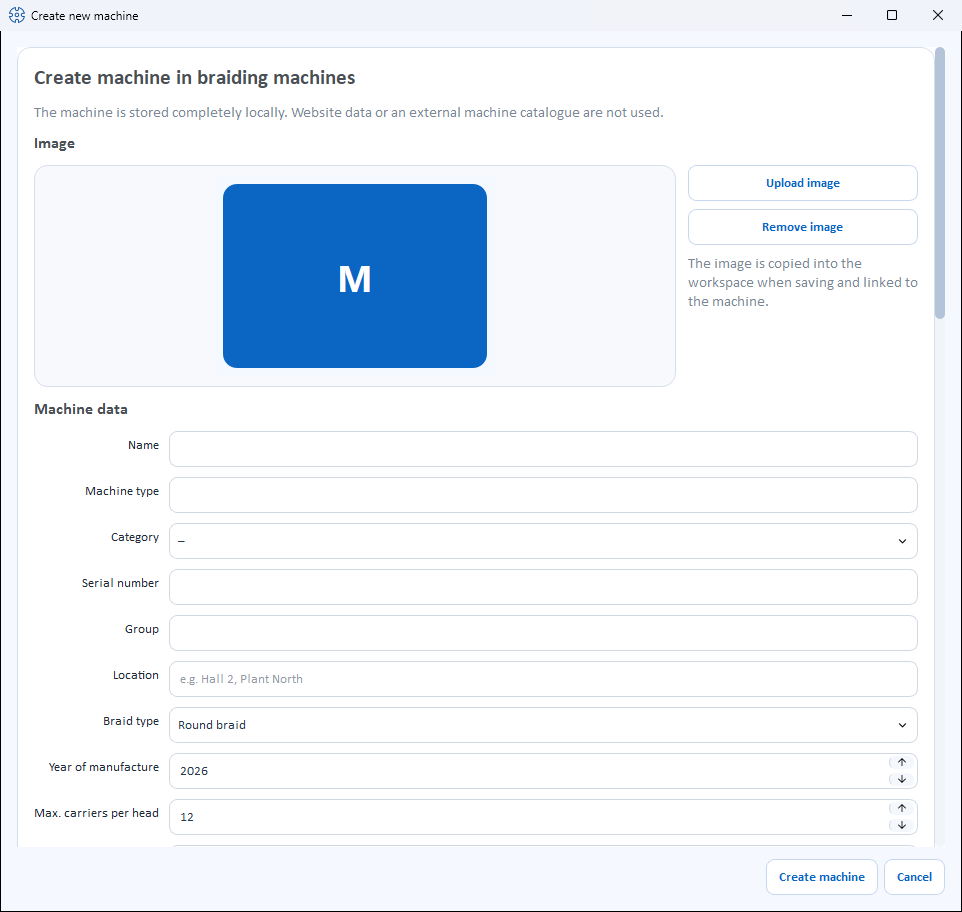
The dialog is divided into several sections (from top to bottom).
Image
- Upload image – selects a machine image from the Media library.
- Use catalogue image – appears only as long as the machine has no image and its Machine type matches a model from the Herzog catalogue. Loads the catalogue image from the internet (from version 2.1.0, not in Herzog CAB Designer).
- Remove image – removes the image again.
When saving, the image is copied into the workspace and linked to the machine.
Braiding machine from the Herzog catalogue
The quickest way to create Herzog braiding machines is via the Herzog catalogue: technology, pitch and image come from there; you choose take-up, setup and accessories with a click.
Machine data
The fields are offered depending on the category – depending on the selected category, the selection lists for heads, slots and carriers change (see Category-dependent fields).
| Field | Meaning |
|---|---|
| Name | Display name of the machine. Required field. |
| Machine type | Type designation (e.g. "SENG 1/40-140"). Required field. If needed, the program derives the category from the type. |
| Category | Machine category from the selection list (e.g. Round braider, Rope braiding machine, Soutache braiding machine, Square braider, Packing braider …) or not set. |
| Serial number | Serial number of the machine. |
| Group | Freely assignable grouping (e.g. machine group). |
| Location | Hall/plant/department (e.g. "Hall 2, Plant North"). Also used for the Factory Planner. |
| Braid type | Round braid or Flat braid. |
| End horngear slots | Visible only for flat braid; selection of the number of slots (default 5 or 6). |
| Year of manufacture | Year of manufacture of the machine (or not set). |
| Max. carriers per head | Maximum number of carriers per braiding head. |
| Heads | Number of braiding heads. |
| Pitch | Pitch of the machine. |
| Carrier type | Designation of the carrier type used (free text). |
| Take-up winding | Yes or No – whether the machine has a take-up winding. |
| Take-up | The take-up of the machine, e.g. Take-up disc Ø 313 x 76 mm. Free text; if the machine type matches a model from the Herzog catalogue, the list offers its take-ups for selection. Leave empty if nothing is specified. |
| Oil quantity | Oil quantity (or not set). |
| Bobbins | Multiple selection of the permitted bobbin types from the bobbin master data. At least one bobbin is required. |
| Speed | Maximum speed in rpm (or not set). |
| Meter counter | Yes or No. |
| Length / Width / Height | Machine dimensions in cm (among other things for the footprint in the Factory Planner). |
Estimate dimensions
Next to the dimension fields is the button Calculate dimensions. It roughly estimates length and width from heads, carriers and pitch – the same logic as the calculation Machine dimensioning. This requires at least 3 carriers per head.
Accessories
The machine's accessories as checkboxes, in two columns:
- Suggestions from the Herzog catalogue – if the Machine type matches a catalogue model, its accessories are offered grouped for selection (e.g. Monitoring and control, Guarding and cabin). If you change the machine type, the suggestions change with it; items already checked stay checked.
- Own accessories – anything not in the catalogue. Enter it in the field below the list and click Add (or press Enter); it appears checked in the list, next to catalogue suggestions under the heading Own accessories.
Whatever is checked is saved. Without a catalogue model, it reads No accessories recorded yet. until you enter your own accessories.
Box views (images)
For display in the 3D Factory Planner you can give the machine a substitute box with view images. Edit box views… opens an editor with live preview in which you assign up to five images:
- Front side
- Back view
- Left side
- Right side
- Top view
A status text shows how many of the five images are stored. In the 3D Factory Planner, the images are placed on the machine box.
Documents
You can store documents for every machine. For each document the list shows Category, File and Description. When adding, you choose one of the following categories:
- Take-up table
- Tension spring chart
- Overview drawing
- Operating manual
- Maintenance sheet
- Switching plan
- Test report
- Other
Use the buttons below to manage the list:
- Add document – choose a file, assign a category and optional description.
- Open – open the selected document in the associated program.
- Remove document – remove the selected document from the list.
When saving, the documents are copied into the workspace (see File locations).
Save
At the bottom, you complete the dialog with Create machine or discard it with Cancel. When editing, the button is called Save.
Category-dependent fields
Most machines follow the round/flat braid logic. Four categories bring their own value lists for Heads, Slots and max. carriers per head – the selection lists adapt automatically as soon as you choose the category:
| Category | Heads | Slots | Carriers per head |
|---|---|---|---|
| Default (round/flat braiders) | 1, 2 | 5, 6 (only for flat braid) | Standard logic |
| Soutache (ST) | 1, 2, 3, 4, 6, 8 | 3, 5, 7, 9, 11 | 3, 5, 7, 9, 11 |
| Square (QU, QSE) | 1, 2 | 4, 6 | 4, 6, 8, 10, 12, 14, 16 |
| Packing (PA) | 1 | 4, 9 | 8, 12, 36 |
Note on display in the Designer
For certain combinations, the dialog shows a note whether the machine can be displayed in the Designer – e.g. for the square braider the 8-carrier square braid, for the packing braider the 3×3 (12 carriers) and 4×4 (36 carriers) as packing braid.
Machine data and order match
Check during the order
The machine data (number of carriers, setup, braid type) determines which designs and products can be produced. Herzog CAB checks these values when creating an order.
Compare machines
Select at least two machines in the list and click Compare; the button shows the number of selected machines, for example Compare (3). The Machine comparison window shows the machines side by side in columns, one row per property. Missing values stay empty.
The comparison works within the respective list: braiding machines, bobbin winding machines, take-up units, pay-off units and creels each have their own rows, plus type, category, year of manufacture, serial number, group, location and dimensions for all of them.
For braiding machines the comparison shows, among others, Carriers per head, Pitch, Speed and Take-up. If you enter a Lay length for production at the top, Production per head and Total production at maximum speed appear, as in the calculation Core-cover product. This applies to round braids; flat braiding machines get no value. If no speed is entered for the machine, the comparison uses the speed of the Herzog catalogue model; the tooltip on the cell says so.
Related pages
- Machine Fleet – fleet and operating overview
- Factory Planner – arrange machines on the floor plan
- Bobbins – permitted bobbin types of the machine
- Bobbin winding machines – master data of the bobbin winding machines
- Take-up units · Pay-off units · Creels – the other machine kinds
- Herzog catalogue – take over braiding machines from Herzog
- Order to machine sheet – workflow from the order to the machine