Web app
Reference — Herzog CAB in the browser at app.herzog-cab.com: what the web app is, what it can do and where to find the modules
What the web app is
Herzog CAB Web is Herzog CAB as an application in the browser. There is nothing to install: you open app.herzog-cab.com, sign in with your user from the customer account and work in your company's workspace — all users of the account see the same orders, designs, machines and master data. The calculators deliver the same results as the desktop app, the Designer draws the same braid patterns, and printing uses the same print templates.
The web app is part of the annual subscription (Herzog CAB Full Version or Herzog CAB Designer) and shares its seats with the program. A seat is one person who is currently working. Anyone working in the program and in the browser at the same time occupies two seats. To try it out, Herzog will set up a free trial version for you on request: 30 days, in the program and in the browser.
The modules
-
Sign in and select account
Sign-in with email address, password and code; account selection; signing out.
-
Interface
Sidebar, header, tabs, user menu and operation on tablet and smartphone.
-
Home page
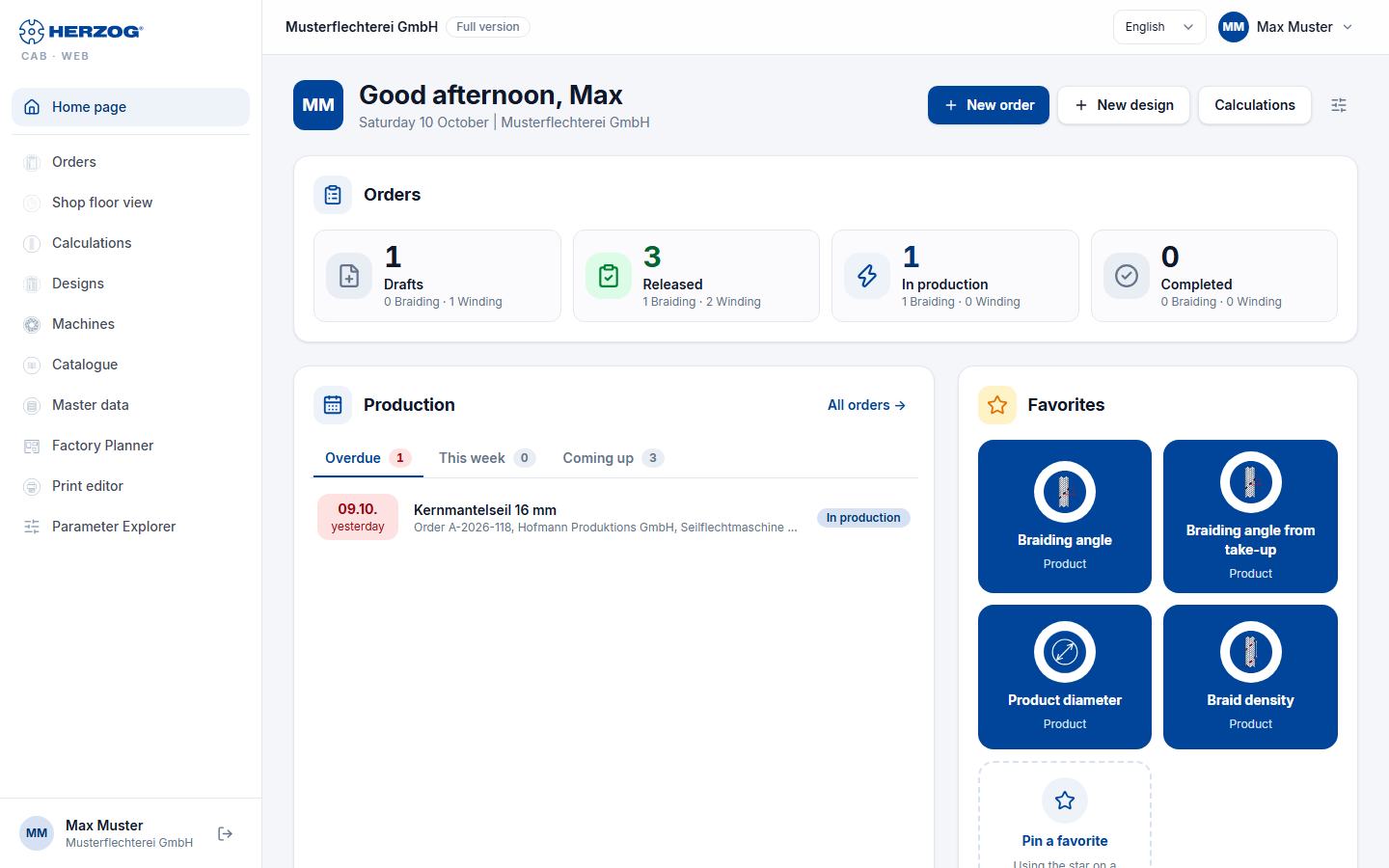
Orders by status, upcoming production, favorites, recently opened items and quick access to all modules; customizable.
-
Orders
Create, filter, edit and print braiding and winding orders.
-
Calculations
All calculators of the desktop app in five groups — the same inputs and results, with favorites and history.
-
Designs and Designer
Design library and Designer with all six braid types, setup overview and true 3D view.
-
Machines
Machine Fleet with braiding and bobbin winding machines, plus the Herzog catalogue.
-
Master data
Materials, bobbins, colors and customers.
-
Factory Planner
Draw floor plans, plan machine assignments, 2D and 3D.
-
Print
Orders, winding orders and designs with print templates as a page or PDF.
-
Print editor
Design print templates for orders, designs and calculations in the browser.
-
Versions and recycle bin
View and restore earlier versions of an entry, bring back deleted entries.
-
User menu
Settings, account and users, subscription and orders, company, media library, recycle bin, roles and the import from the desktop app.
Settings · Account and users · Subscription and orders · Company · Media library · Recycle bin · Roles · Import from the desktop app
-
Trial and registration
Try it free for 30 days: request a trial version, limits of the trial, the way to a subscription.
Desktop app and web app compared
Both programs work with the same data model; a workspace of the desktop app can be transferred into the web app. Not everything exists in both — the most important differences:
| Desktop app | Web app | |
|---|---|---|
| Installation | Windows / macOS, installer | none — browser |
| Data | workspace folder on the computer or a network drive, per profile | central in the customer account, one workspace per account |
| Users | account users (or local / Entra / LDAP with dongle) | account users only |
| Calculations | all calculators, history, favorites | the same calculators, history and favorites per user on all devices, search |
| Designer | all six braid types, coloring by click, twist per carrier, plying colors (color per yarn), track animation, true 3D, two-window comparison, mixed designs | all six braid types, coloring by click, textures, plying colors (color per yarn), occupation overview with animation, true 3D; one design per page, mixed designs view only |
| Braiding Simulator | with a model licence: set up, program, check, output switching plan, see Braiding Simulator | with a model licence: set up, program, check; switching plan only in the desktop app, see Braiding Simulator (web app) |
| Edit lock | lock on entries that someone else is editing; read-only until they are free | the same, with cloud sync also towards the desktop app, see Edit lock |
| Versions | — | earlier versions and recycle bin for orders, designs, machines, master data, hall plans and print templates, also for changes from the cloud sync |
| Orders | braiding and winding order, period filter, duplicating | braiding and winding order, filter by type, status and machine |
| Printing | print editor for templates, printing via Windows | Print editor for templates (with undo and preview with sample data), printing via the browser, PDF |
| Factory Planner | 2D editor with wall textures, context menus, automatic areas, 3D | 2D editor (walls, areas, doors, gates, windows, stairs, calibrating), 3D view |
| Machines | Machine Fleet, Herzog catalogue (from 2.1.0), master data dialogs, 3D models | Machine Fleet with cards/list, catalogue, full machine maintenance |
| Mobile use | web server with QR code (order view) | the whole app, adapted to tablet and smartphone |
| Licence | annual subscription, one seat per running program | the same annual subscription, one seat per person in the browser |
A comparison to support the decision in your plant is available under Desktop app or web app?.
Languages
Like the desktop app, the web app is available in German, English, Polish, Spanish, Italian and Chinese. You choose the language in the header or under Settings; it applies to your user on all devices.
Related pages
- Customer account and invitation
- System requirements — browser and screen
- Bringing data from the desktop into the web app
- Licence portal — modules and seats