Take-up units
Reference — Create and maintain take-up units of the series AW, AWS, AWST, AWSP, AWSA and AWH: drum dimensions, load capacity, design, reel, accessories and documents.
What you use this area for
Under Master data > Take-up units you create the take-up units of your plant. A take-up unit stands behind the braiding machine and winds the finished product onto a drum or a reel. Its limits — which drums it accepts, how heavy the loaded drum may be, which product diameters it processes — are checked by Herzog CAB in the Drum and take-up unit selection and in the braiding order (tab Take-up winding). In the Machine Fleet, take-up units have their own filter.
New in version 2.1.0
Take-up units are a separate machine kind. The list is structured like that of the bobbin winding machines; for creating and editing, a separate dialog opens with drum dimensions, load capacity and design.
The screen at a glance
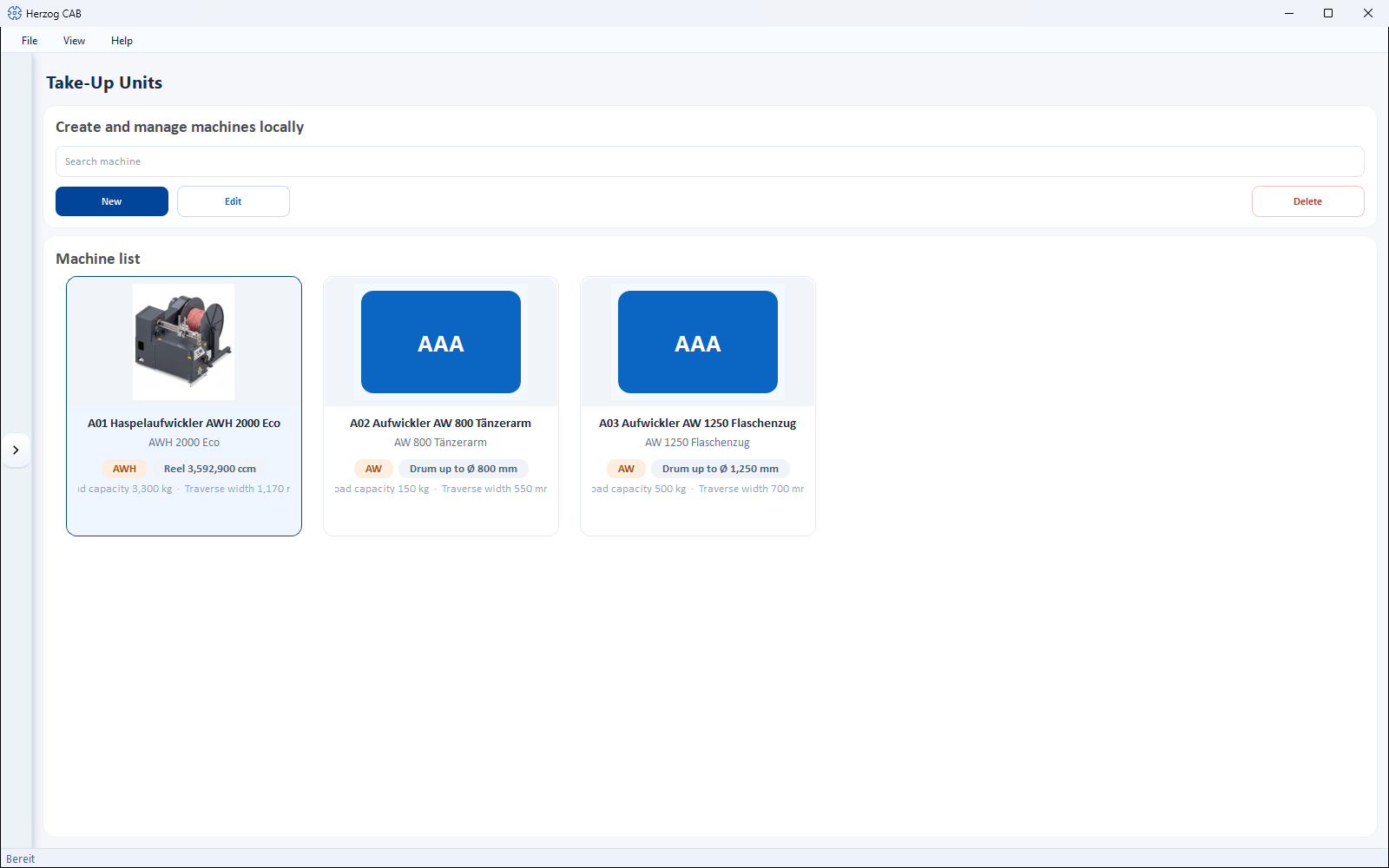
At the top is a toolbar, below it the Machine list as cards. Each card shows image, series (without series: Take-up units) and the most important information:
- Drum up to Ø … mm — the largest drum diameter; for a take-up unit with reel, Reel … ccm instead,
- Load capacity … kg and Traverse width … mm, if stored.
Toolbar
| Button | Effect |
|---|---|
| Search machine | Filters the list. |
| New | Opens the dialog Create new take-up unit (see below). |
| Edit | Opens the selected take-up unit in the dialog Edit take-up unit. |
| Delete | Removes the selected machine(s) with confirmation prompt. |
Double-clicking a card also opens the take-up unit for editing. Right-clicking opens a context menu with Open, Edit, Duplicate and Delete; the copy is called "… (copy)".
Take-up unit from the Herzog catalogue
The quickest way to create Herzog take-up units is via the Herzog catalogue (tab Take-up units): technology and image come from there; you only enter group, serial number and name.
The "Create new take-up unit" dialog
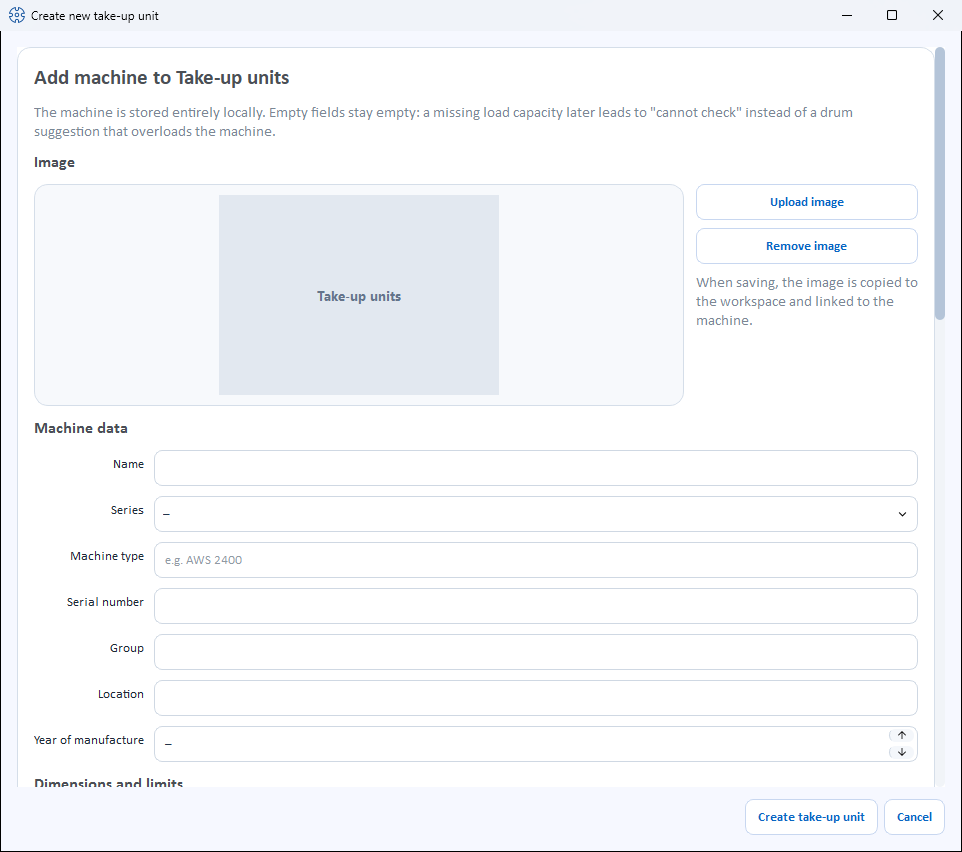
The dialog is divided into sections from top to bottom. Empty number fields show a dash with unit (e.g. – mm) and count as not stored.
Leave unknown values empty
Only enter what you really know. If, for example, the Load capacity is missing, the drum and take-up unit selection reports the load capacity as not checkable — instead of suggesting a drum that overloads the take-up unit.
Image
- Upload image – selects a machine image from the Media library.
- Use catalogue image – appears only as long as the take-up unit has no image of its own and its Machine type matches a model from the Herzog catalogue. Loads the catalogue image from the internet (an internet connection is required for this).
- Remove image – removes the image again.
When saving, the image is copied into the workspace and linked to the machine.
Machine data
| Field | Meaning |
|---|---|
| Name | Display name of the machine. Required field. |
| Series | One of the series (see below) or –. When selected, the series AWH sets the checkbox This machine winds onto a reel. |
| Machine type | Type designation, e.g. AWS 2400. If the field is left empty, the series is saved as the machine type. If the type matches a catalogue model, its accessory suggestions and the catalogue image appear. |
| Serial number | Serial number of the machine. |
| Group | Freely assignable grouping. |
| Location | Hall/plant/department. |
| Year of manufacture | Year of manufacture (or –). |
Dimensions and limits
| Field | Unit | Meaning |
|---|---|---|
| Drum diameter (min–max) | mm | Smallest and largest drum diameter that the take-up unit accepts. |
| Max. traverse width | mm | Largest traverse width; wider drums do not fit. |
| Load capacity | kg | Total weight of the loaded drum: drum plus wound product. |
| Quill diameter | mm | Diameter of the quill. It is adapted to the respective drum and does not decide whether a drum fits. |
| Braid diameter (min–max) | mm | Smallest and largest product diameter that the take-up unit processes (one decimal place). |
| Line speed (min–max) | m/h | Speed range of the take-up unit. |
Design
| Field | Meaning |
|---|---|
| Drum lift | no lift, hand crank, electric, hydraulic or motorized spindle drive (or –). |
| Traversing | Uhing, traversing drum or electronic parallel traversing (or –). |
| Tension control | Checkboxes Block and tackle, Dancer arm, Servo motor, Torque control — several possible at once. |
| Traverse type | Checkbox traversing. |
| Winding tension (min–max) | Tension range in kg. |
| Traverse step (min–max) | Smallest and largest traverse step in mm. |
| Control | mechanical, Display or PLC with touch panel (or –). |
| Counters | Checkboxes Layer counter, Operating hours counter, Product data management. |
Reel instead of drum
| Field | Meaning |
|---|---|
| This machine winds onto a reel | Checkbox for take-up units that do not wind onto an exchangeable drum but onto their own reel. The reel belongs to the take-up unit and is not changed. |
| Reel volume | Holding volume of the reel in ccm. Editable only when the checkbox is set. The limit is then set by the reel volume, not by the drum diameter. |
Accessories
The accessories of the take-up unit as checkboxes — as for the braiding machines: suggestions from the Herzog catalogue (if the machine type matches a catalogue model) and own accessories via the field Add accessory with Add. Whatever is checked is saved.
Documents
Documents for the machine with the columns Category, File and Description. When adding, you choose one of the categories:
- Operating manual
- Data sheet
- Maintenance
- Spare parts
- Other
The buttons below are Add document, Open and Remove document.
Save
At the bottom, you complete the dialog with Create take-up unit or discard it with Cancel. When editing, the button is called Save.
When saving, the dialog checks:
- Without a name, Please enter a name. appears.
- If, for one of the ranges (drum diameter, braid diameter, line speed, winding tension, traverse step), the lower value is greater than the upper one, the dialog reports "…: the lower value is greater than the upper one." — a reversed range would prevent every suggestion in the drum and take-up unit selection.
The series
| Series | Designation |
|---|---|
| AW | Take-up unit |
| AWS | Take-up unit with servo drive |
| AWST | Take-up unit with traversing drum |
| AWSP | Gantry take-up unit |
| AWSA | Heavy-duty take-up unit |
| AWH | Reel take-up unit |
Which information is checked
The Drum and take-up unit selection and the Take-up winding tab in the braiding order compare drum and product with this information of the take-up unit:
| Information of the take-up unit | Is compared with |
|---|---|
| Drum diameter (min–max) | the outer diameter of the drum |
| Max. traverse width | the drum width (otherwise the traverse width) of the drum |
| Braid diameter (min–max) | the product diameter |
| Load capacity | the weight of product and empty drum |
| Reel volume | for reel take-up units: determines how much product fits on the reel |
If the take-up unit lacks the largest drum diameter, the traverse width or the load capacity, the result is not checkable instead of fits. The remaining fields (e.g. line speed, winding tension, quill) are descriptive.
This is how the result for a take-up unit comes about:
flowchart TD
  T[Drum] --> M[Drum diameter<br>and traverse width]
  P[Product] --> G[Braid diameter]
  T --> L[Load capacity:<br>product and empty drum]
  P --> L
  M --> F{A limit<br>exceeded?}
  G --> F
  L --> F
  F -- yes --> X[does not fit]
  F -- no --> U{A value<br>missing?}
  U -- yes --> N[not checkable]
  U -- no --> OK[fits]
Related pages
- Drums – the drums onto which the take-up unit winds
- Drum and take-up unit selection – find matching drums and take-up units
- Braiding order, tab "Take-up winding" – take-up unit and drum in the order
- Herzog catalogue – take over take-up units from Herzog
- Pay-off units · Creels · Bobbin winding machines · Braiding machines
- Machine Fleet – operating overview of all machines