Drums
Reference — Create drums (dimensions, bobbin volume, empty weight, mounting) once and reuse them in calculations and orders.
What you use this area for
Under Master data > Drums you maintain the drums onto which your take-up units wind the finished product. The database holds designs, not individual drums: you create a drum with the same dimensions once, no matter how many of them are in the plant. The drums are selected in these areas:
- Product length per drum,
- Drum and take-up unit selection,
- in the braiding order, tab Take-up winding.
New in version 2.1.0 — workspace folders start without drums
New workspace folders no longer contain supplied drums. You take over Herzog drums and reels with From Herzog catalogue …; you create your own drums alongside them — just as with the bobbins. Existing workspace folders remain unchanged.
The screen at a glance
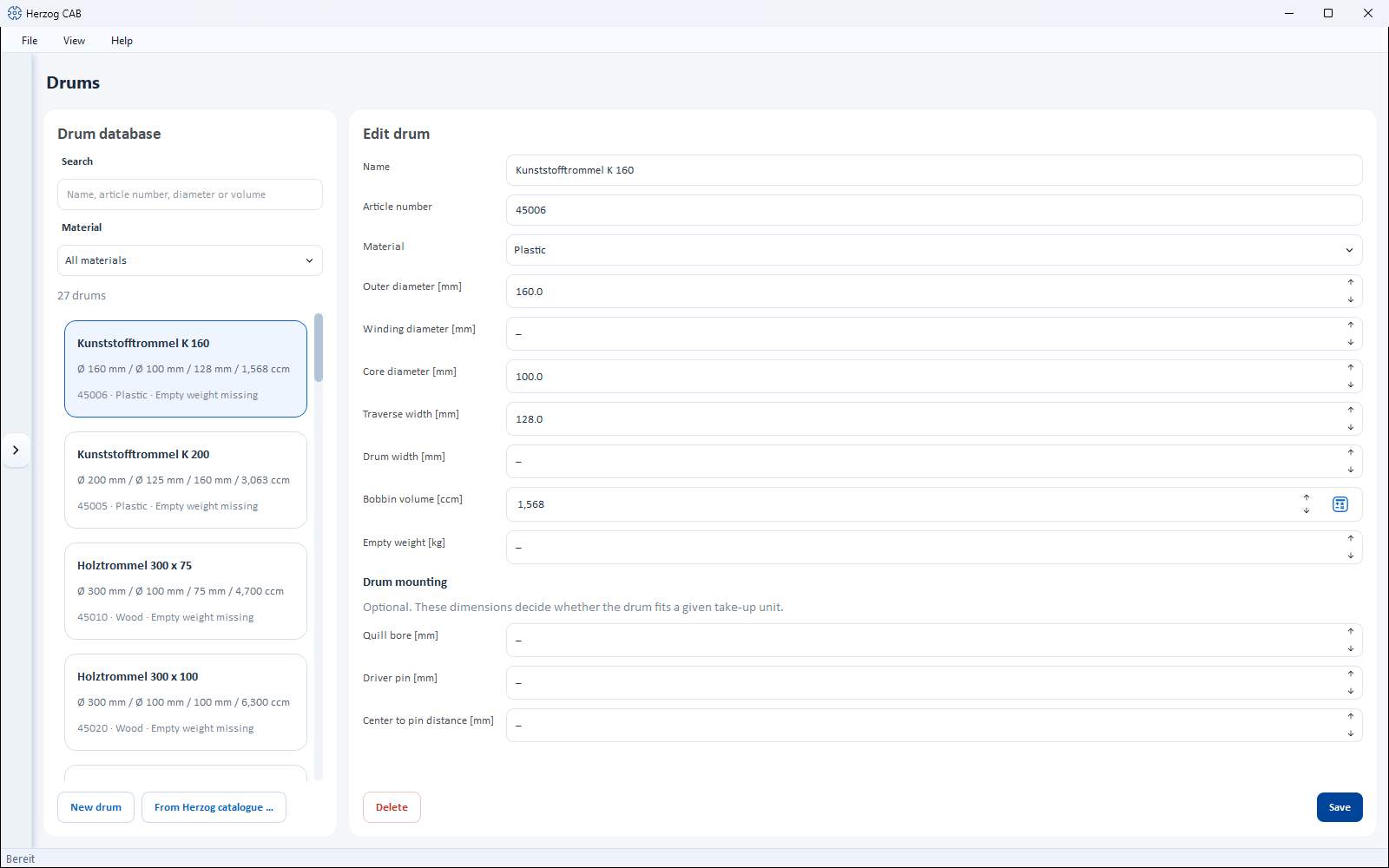
The page is structured like the Bobbin editor:
- Drum database (left) – search, Material filter, the list of drums as cards and below it the buttons for creating.
- Edit drum (right) – the properties of the selected drum.
Controls in detail
Search and filter
- Search – filters by designation, article number, diameter or volume.
- Material – restricts the list to Wood, Steel, Plastic or Other (default: All materials).
Above the list you see how many drums are shown ("12 drums" or "3 of 12 drums"). If the database is empty, it reads No drums yet. Add them with "From Herzog catalogue …".
The drum cards
Each card shows:
- the Designation — without a designation, the dimension line,
- the dimension line Ø outer diameter / Ø core diameter / traverse width / bobbin volume,
- article number, material and the empty weight ("… kg empty") — if it is missing, it reads Empty weight missing.
New drum and From Herzog catalogue …
| Button | Effect |
|---|---|
| New drum | Clears the form on the right for a new drum. The Save button is then called Create drum. |
| From Herzog catalogue … | Opens the Herzog catalogue on the Drums tab. There you take over Herzog drums with their dimensions via Add to drums. Not in Herzog CAB Designer. |
What comes from the catalogue
Drums taken over bring designation, material, dimensions and bobbin volume with them. The Article number field remains empty — it is intended for your own number. You add the Empty weight yourself; without empty weight, the drum and take-up unit selection reports the load capacity as not checkable. Reels from the catalogue cannot be taken over.
Fields of a drum
| Field | Unit | Description |
|---|---|---|
| Designation | – | Free name, e.g. Wooden drum 420 x 250. Empty = the dimension line serves as the name. |
| Article number | – | Free, your own number. |
| Material | – | Wood, Steel, Plastic, Other or — not specified —. |
| Outer diameter [mm] | mm | Diameter across the flanges. Required field. |
| Winding diameter [mm] | mm | Diameter up to which winding actually takes place. Leave empty if winding goes up to the flange edge — the outer diameter then applies. |
| Core diameter [mm] | mm | Diameter of the drum core. Required field; must be smaller than the winding diameter. |
| Traverse width [mm] | mm | Windable width between the flanges. |
| Drum width [mm] | mm | Overall width. Leave empty if it equals the traverse width. |
| Bobbin volume [ccm] | ccm | Holding volume of the drum. Derived from the dimensions (see below) and can still be overwritten. |
| Empty weight [kg] | kg | Weight of the empty drum. Counts towards the load capacity of the take-up unit. |
Traverse width and drum width stand in for each other: if only one of the two fields is filled, it applies to both.
Derive bobbin volume automatically
As long as you do not change the Bobbin volume [ccm] field yourself, Herzog CAB recalculates it with every dimension change — from the winding diameter (otherwise the outer diameter), the core diameter and the traverse width (otherwise the drum width). If you have entered the volume by hand, for example the value from a data sheet, it stays. The calculate button at the field switches the derivation back on.
Section "Drum mounting"
Optional dimensions of the mounting on the take-up unit:
| Field | Unit | Description |
|---|---|---|
| Quill bore [mm] | mm | Diameter of the bore for the quill. |
| Driver pin [mm] | mm | Diameter of the driver pin. |
| Center to pin distance [mm] | mm | Distance from the drum center to the driver pin. |
Save and delete
- Save (or Create drum) – saves the drum. If outer diameter, core diameter or traverse width (or drum width) are missing, Outer diameter, core diameter and traverse width are required. appears; if the core is not smaller than the winding diameter, The core diameter must be smaller than the winding diameter. appears.
- Delete – removes the selected drum after the prompt Delete the drum "…"?
Permission required
To create, change and delete you need the permission Edit master data. Without this permission you see all values but cannot change them; search and filter remain usable.
Related pages
- Take-up units – which drums a take-up unit accepts
- Drum and take-up unit selection – have a matching drum suggested
- Product length per drum – length on a drum
- Herzog catalogue – take over drums from Herzog
- Bobbins – master data with the same structure for carrier bobbins